Real-Time Link Analytics: A Marketer's Guide for 2026
Real-Time Link Analytics: A Marketer’s Guide for 2026
For any time-sensitive campaign, the right tool is a real-time link analytics platform with sub-5-second click latency, UTM and referrer capture, and privacy controls that don’t store raw IP addresses. Start by creating a free account on Rdyrct, shortening one URL with UTM parameters, and watching the live feed register your first click within seconds.
Three things to do right now:
- Create a tracked short link with UTM source, medium, and campaign tags
- Open the live click feed and send a test click from your phone
- Confirm geo, device, and referrer data appear before you run any real traffic
Key Takeaways
Real-time link analytics is most valuable when it combines sub-5-second latency, event-level data capture, and a privacy architecture that doesn’t store raw IP addresses.
| Point | Details |
|---|---|
| Test latency before committing | Click your own link and time how long it takes to appear in the live feed; over 10 seconds is a red flag. |
| Three red flags to avoid | No raw event export, opaque IP retention policy, and no webhook or API on any plan. |
| Privacy-first defaults | Choose a platform that anonymizes IP at capture, skips tracking cookies, and publishes a clear retention policy. |
| UTM capture is non-negotiable | Confirm referrer and UTM data appear on your plan tier before building campaign workflows around the tool. |
| Rdyrct as the recommended option | Rdyrct provides live click feeds, anonymized geo and device data, branded links, and a free forever plan with no IP storage. |
Table of Contents
- What is real-time link analytics and why does it beat batch reporting?
- How real-time link tracking captures and delivers click events
- What core features should you compare across link analytics tools?
- Where does real-time link analytics deliver the most value?
- How do you choose the right real-time link analytics tool?
- What pricing trade-offs should you expect?
- Step-by-step quickstart: create a tracked link and validate a live click
- Privacy and U.S. legal considerations for link analytics
- Why privacy-first architecture matters and how Rdyrct implements it
- The part most marketers skip
- Rdyrct gives you live analytics without the privacy trade-off
- Sources
What is real-time link analytics and why does it beat batch reporting?
Real-time link analytics captures and displays click events with low latency, often within a few seconds of a user clicking a link. Batch reporting, by contrast, aggregates data on a schedule, often hourly or daily, so you’re always looking at the past. For a product launch or a flash sale, that lag is the difference between catching a broken redirect in the first ten minutes and discovering it after the campaign ends.
The primary outputs of a live tracking system are:
- Live click feed: a timestamped stream of individual click events
- Geo map: country and region-level location data, updated in near real time
- Device and browser split: mobile vs. desktop, OS, browser version
- Referrer and UTM capture: where the click came from and which campaign drove it
Three factors determine whether a tool actually delivers on the “real-time” promise. Latency is the first: a 30-second delay is not real time, it’s slow batch. Retention window is the second: a 7-day history is nearly useless for quarterly campaign reviews. Data fidelity is the third: if a tool samples clicks rather than recording every event, you’re working with estimates, not facts.
Clicky is one of the established names in privacy-first real-time analytics, with live visitor logs and event-level action tracking used across a large number of sites globally.
How real-time link tracking captures and delivers click events
Every real-time link analytics tool relies on the same basic architecture, even when the implementation details differ.
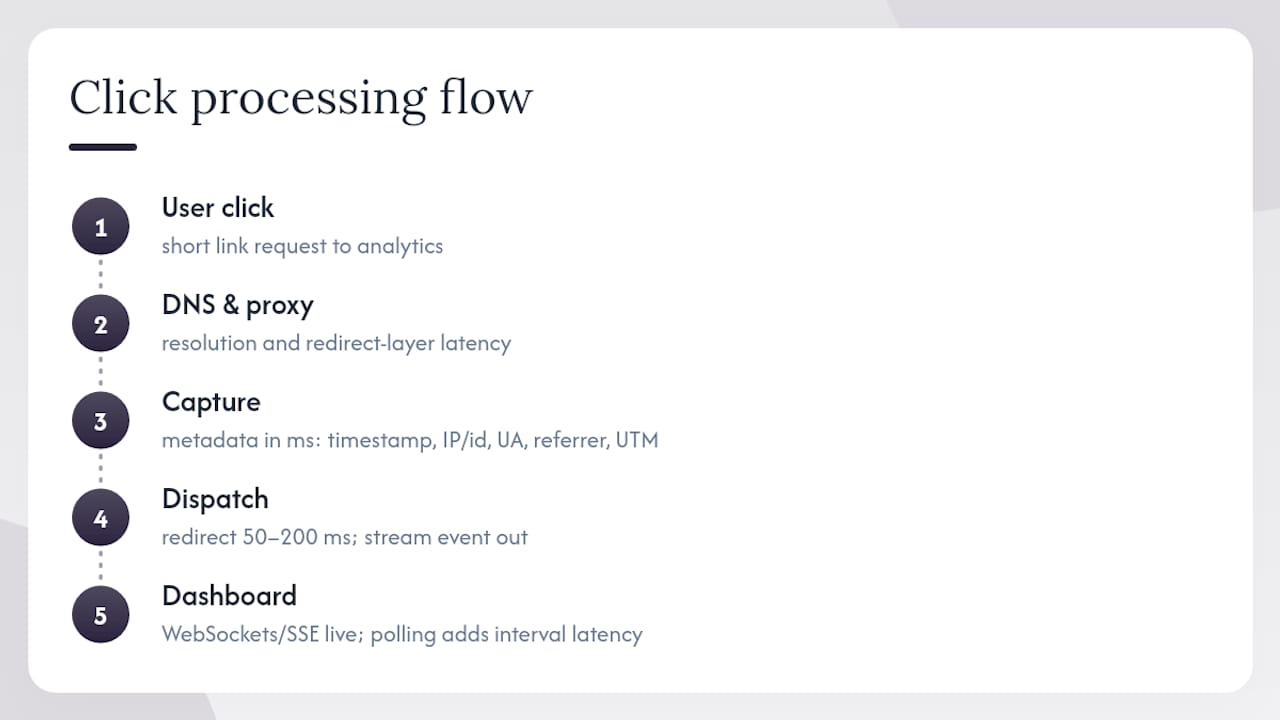
The redirect and beacon model works like this: a user clicks your short link, the request hits the analytics server, metadata is captured (timestamp, IP or anonymized identifier, user-agent, referrer, UTM parameters), and then the user is forwarded to the destination URL. That capture step happens in milliseconds. The redirect itself adds a small but measurable delay, typically 50–200ms on a well-optimized platform.
Streaming updates are what separate a live dashboard from a page you have to refresh. Most modern platforms use WebSockets or Server-Sent Events (SSE) to push new click events to your browser the moment they’re processed. A polling approach, where the dashboard requests new data every few seconds, works but introduces artificial latency equal to the polling interval.
Event-level vs. aggregated data is a meaningful distinction. A live feed shows you individual clicks: “User in Chicago, iPhone 15, arrived via Twitter, 2:14:07 PM.” An aggregated report shows you “142 clicks from Illinois today.” Both are useful, but only event-level data lets you spot anomalies, like a sudden spike from a single IP or a referrer you didn’t expect.
Latency sources stack up quickly: DNS resolution, the proxy or redirect layer, the event processing pipeline, and the UI rendering. A platform that advertises “real-time” but polls every 30 seconds is misleading you. Rdyrct’s architecture combines redirect-based capture with a lightweight streaming service and an event buffer that preserves order while keeping user-facing latency low.
Pro Tip: Send test clicks from a mobile device on cellular data, a desktop on Wi-Fi, and a private browser window. That combination validates geo detection, device classification, and session isolation simultaneously.
What core features should you compare across link analytics tools?
Not every tool captures the same data or surfaces it the same way. Here’s the feature checklist that separates adequate tools from genuinely useful ones:
- Live click feed with per-event timestamps
- World map with country and region-level geo data
- Device and browser breakdown (mobile/desktop, OS, browser)
- Referrer capture and UTM parameter parsing
- Webhook and API access for downstream integrations
- Custom domain support for branded short links
- Branded QR code generation
- Configurable retention window (ideally 90+ days on paid plans)
- CSV or raw event export
- Team access controls and role management
When you’re evaluating vendors, these are the dimensions that matter most:
| Dimension | What to check |
|---|---|
| Real-time latency | Seconds from click to dashboard appearance; under 5s is the target |
| Data captured | Geo (country/region), device, browser, referrer, UTM parameters |
| Privacy and retention | Whether IP addresses are stored; retention window length |
| Integrations and webhooks | REST API availability, webhook payload format, rate limits |
| Dashboard features | Live feed, world map, click counters, export options |
| Branding options | Custom domain support, branded QR code generation |
The branding column matters more than it looks. A branded short link (yourcompany.co/launch) builds trust with recipients and keeps your domain authority intact. Branded QR codes extend that identity into physical spaces.
Where does real-time link analytics deliver the most value?
The use cases where live click data changes decisions, not just reports, tend to share one trait: time pressure.
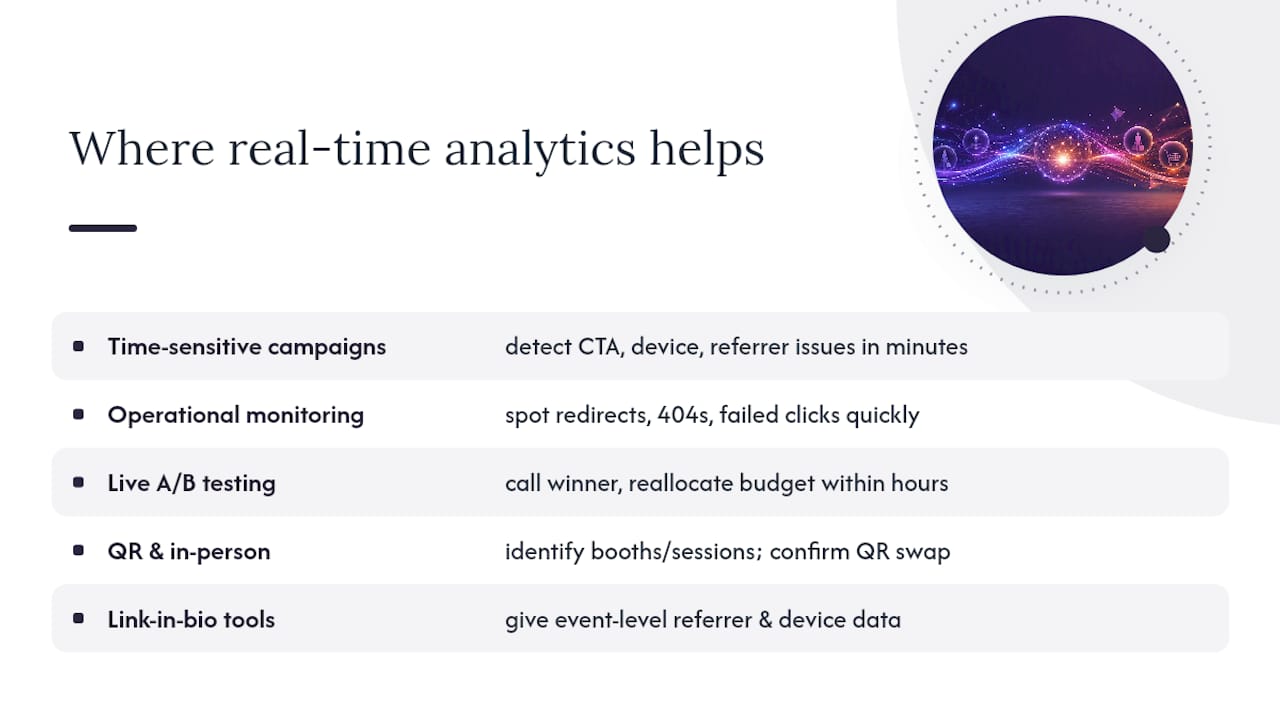
Time-sensitive campaigns are the obvious fit. A product launch email goes out at 9 AM, and by 9:05 you can see whether the CTA link is working, which device segment is clicking first, and whether the referrer data matches your send list. Real-time analytics power immediate operational decisions the same way fraud detection systems flag suspicious transactions before they clear, not after.
Operational monitoring is underused. If a redirect loop breaks or a destination URL returns a 404, a live feed shows the spike in failed or anomalous clicks within minutes. Without live monitoring, you might not catch that until a campaign manager checks the next-day report.
A/B testing during live campaigns is where latency really earns its keep. If you’re running two link variants to different audience segments, real-time data lets you call a winner and redirect budget within hours, not days.
QR campaigns and in-person activations add a physical dimension. Scan timing tells you which booth, which session, or which print placement drove engagement. Dynamic QR codes that update their destination without reprinting the code are especially useful here, since you can swap the destination URL mid-event and watch the live feed confirm the change took effect.
Link-in-bio tools used by creators also benefit from this kind of tracking. Platforms reviewed on sites like Link in Bio Hub often surface basic click counts, but they rarely give you the event-level referrer and device data that a dedicated link analytics tool provides.
How do you choose the right real-time link analytics tool?
Start with a five-minute scoring exercise before you commit to any platform.
- Test actual latency. Create a free account, shorten a URL, click it from your phone, and time how long it takes to appear in the dashboard. If it’s over 10 seconds, move on.
- Check what data is captured. Does the free tier show referrer and UTM data, or is that paywalled? Geo and device breakdowns should be available on any paid plan.
- Read the privacy policy for IP handling. Does the platform store raw IP addresses? For U.S. users with CCPA exposure, this matters.
- Test the API or webhook. Send a test event to a webhook endpoint and confirm the payload includes the fields you need.
- Check retention limits. A 7-day free-tier window is common but often insufficient. Know what you’re getting before you build workflows around it.
Red flags to walk away from:
- No free trial or live demo available
- Retention policy is vague or buried in fine print
- No raw event export (you can’t own your data)
- Mandatory third-party tracking cookies with no opt-out
- No webhook or API on any plan
Decision tips by persona:
- Solo creator: Prioritize a generous free tier, branded links, and a clean mobile dashboard. API access is a nice-to-have, not a requirement.
- Small business owner: Custom domain support and retention of at least 90 days matter most. Look for team seats on the entry paid plan.
- Marketing team: API and webhook access are non-negotiable. You need to pipe click events into your CRM, Slack, or data warehouse. Check rate limits carefully.
For a broader view of how branded short-link platforms compare on features and integrations, the Rebrandly alternatives guide covers the key differentiators worth checking.
What pricing trade-offs should you expect?
Free tiers across link analytics tools typically come with three constraints: a cap on the number of active links, a cap on monthly clicks, and a short retention window, usually 30–90 days. Those limits are fine for testing but break down fast under real campaign volume.
Paid plans generally unlock:
- Longer retention (6–24 months on mid-tier plans)
- Custom domain and branded link support
- Branded QR code generation
- API and webhook access
- Additional team seats
- Priority support with faster response times
The cost drivers that catch people off guard are custom domains (often a per-domain fee or a plan-tier gate), QR code generation (sometimes limited to paid plans), and API rate limits (which can force an upgrade if you’re piping events to a data warehouse at scale).
To forecast your needs: estimate your expected monthly click volume, decide how far back you need to query historical data, and check whether you need more than one custom domain. Those three numbers will tell you which tier you actually need before you sign up.
Step-by-step quickstart: create a tracked link and validate a live click
Follow these steps to go from zero to a confirmed live feed in under ten minutes.
- Create your account and connect a custom domain. Most platforms walk you through DNS configuration. Allow up to 24 hours for propagation, though many resolve within minutes on Cloudflare-based setups.
- Shorten your destination URL and add UTM parameters. Use UTM source, medium, and campaign at minimum. Some tools include a UTM builder in the link creation flow.
- Enable the live feed or streaming view in your dashboard. Look for a “live” or “real-time” tab. Keep it open in a separate browser tab.
- Click your link from a mobile device on cellular data. This is your first controlled test. Watch for the event to appear in the live feed within 5 seconds.
- Confirm geo, device, and referrer data are captured. The event should show your country, mobile device type, and the referrer (direct, if you typed the URL, or the source if you clicked from a message).
- Set up a webhook if you need downstream integrations. Point it at a test endpoint (RequestBin or a similar tool works) and confirm the payload structure matches what your CRM or data pipeline expects.
- Review retention settings. Check the default retention window and adjust if your plan allows it.
Pro Tip: Use a private browser window for one test click and a VPN exit node in a different U.S. city for another. That validates both session isolation and geo detection accuracy before you run live traffic.
Troubleshooting checklist:
- Custom domain not resolving: check DNS propagation and confirm CNAME records are correct
- Webhook not firing: verify the endpoint URL is publicly accessible and check for CORS headers if you’re testing locally
- Clicks not appearing in live feed: confirm you’re not behind a corporate proxy that caches redirects
Privacy and U.S. legal considerations for link analytics
The privacy question in link analytics comes down to one thing: what does the platform do with the IP address it captures at click time?
Core privacy checks to run before you commit to any tool:
- Does the platform store raw IP addresses, or does it hash or discard them immediately after geo lookup?
- Are tracking cookies used, and if so, can they be disabled?
- Is anonymous event tracking available as a default or opt-in?
- Does the platform publish a clear data retention and deletion policy?
U.S.-specific considerations center on the California Consumer Privacy Act (CCPA) and the growing number of state-level privacy laws following similar frameworks. If your links are clicked by California residents and the platform stores identifiable click data, you may have disclosure and opt-out obligations. The practical default: choose a platform that anonymizes IP addresses and avoids persistent tracking cookies, which reduces your compliance surface significantly.
Clicky’s privacy documentation shows one approach: the platform can operate without storing personal data, without tracking cookies, and without requiring cookie consent banners in certain configurations. That’s the model worth emulating.
A privacy-first default stack looks like this: anonymize IP at capture, minimize retention to what you actually use, skip third-party tracking cookies entirely, and publish a plain-language privacy statement on any page where tracked links appear.
For a deeper look at cookieless tracking approaches, Rdyrct’s cookieless analytics guide covers practical implementation steps for anonymized link analytics without sacrificing the data you actually need.
This section is general guidance, not legal advice. If your organization operates in a regulated industry or handles sensitive consumer data, consult qualified legal counsel about your specific obligations under CCPA and applicable state laws.
Why privacy-first architecture matters and how Rdyrct implements it
Most link shorteners were built when IP logging was the default and privacy was an afterthought. Rdyrct was built the other way around.
The platform runs on Cloudflare’s global network, which can help keep redirect latency low regardless of where your audience is located. The analytics pipeline anonymizes click data at capture, so no raw IP addresses are stored. For teams that need full control, Cloudflare Workers-based self-hosting is available as an open-source option, which means your click data never leaves your own infrastructure.
Feature highlights that matter for real campaigns:
- Live click feed with sub-5-second latency
- Country and region-level geo data without IP storage
- Device, browser, and referrer capture on every click
- UTM parameter parsing built into the link creation flow
- Custom domains and branded short links
- Branded QR code generation for in-person campaigns
- Team roles and organization-level access management
- REST API and webhook support for downstream integrations
- Free forever plan with no credit card required
The free tier gives you enough to validate the live feed, test UTM capture, and confirm geo and device data before you commit to a paid plan. That’s a meaningful difference from platforms that gate live feed access behind a trial period.
The part most marketers skip
The evaluation checklist in this guide covers latency, retention, privacy, and integrations. Most marketers read it, nod, and then pick the tool with the nicest dashboard.
The thing they miss: data ownership. If a platform doesn’t let you export raw click events, you don’t own your analytics history. You’re renting it. The moment you cancel or the platform changes its pricing, that data is gone. Before you build any campaign workflow around a link analytics tool, confirm that raw event export is available on your plan and test it. Download a CSV of last week’s clicks and make sure it includes the fields you actually need.
The second thing worth saying: privacy-first architecture isn’t just a compliance checkbox. Platforms that anonymize IP addresses and skip tracking cookies tend to capture more accurate data, not less, because they’re not blocked by browser privacy settings or ad blockers. A reverse-proxy tracking approach routes beacons through your own domain, which means ad blockers that target third-party scripts don’t suppress your click events. You get cleaner numbers and a cleaner conscience.
Rdyrct gives you live analytics without the privacy trade-off
Most link analytics tools make you choose: either you get rich click data and accept IP logging and tracking cookies, or you go privacy-first and lose granularity. Rdyrct removes that trade-off.

You get a live click feed, country and device-level geo data, referrer and UTM capture, branded short links, custom domains, and branded QR codes, all on a platform that doesn’t store raw IP addresses and doesn’t use tracking cookies. The free forever plan lets you test the full live feed workflow before you spend anything. For teams that need more, paid plans add longer retention, additional custom domains, API and webhook access, and team seat management.
Create your first tracked link on Rdyrct, add UTM parameters, and watch the live feed confirm your first click. That’s the whole test. If the data appears within 5 seconds and shows geo, device, and referrer, you have what you need to run real campaigns.
Sources
- Privacy-friendly Google Analytics alternative | Real-time Web Analytics | Clicky
- Real-Time Analytics With Examples - MongoDB