QR Code Testing: A Checklist for Marketers and Developers
QR Code Testing: A Checklist for Marketers and Developers

Before a QR code goes to print, run four checks in this order: confirm the short link resolves with a valid HTTP redirect, confirm UTM parameters survive to the final landing page, confirm the scan registers as an event in GA4 or your server logs, and confirm your logging setup stays privacy-safe by default. Skip any of the four and you’ll find out the hard way, usually after a large batch of flyers are already at the printer.
For each step, collect a specific piece of evidence: the HTTP status code and final URL, the exact parameter string on the landing page, a GA4 Realtime hit or a server-side log row, and a quick audit of what fields your redirect actually stores. Here’s the minimum you should run before approving any QR proof:
- Curl the short URL and confirm a 301 or 302 status with a clean Location header
- Open the destination and check every UTM value matches what you built
- Watch GA4 Realtime (or your server log) for the scan event within seconds
- Confirm the redirect service isn’t logging full IPs or raw timestamps
- Test the link inside at least one in-app browser (Instagram, Gmail) before printing
Key Takeaways
Reliable QR code tracking depends on tagging UTMs before shortening, verifying every redirect hop, and logging only the minimal fields needed to attribute a scan.
| Point | Details |
|---|---|
| Build UTMs before shortening | Add UTM parameters to the destination URL first, then shorten, to avoid stripping. |
| Verify every redirect hop | Use curl -IL to confirm status codes and check the Location header at each hop. |
| Keep event data minimal | Capture campaign ID, placement ID, and redirect status; skip full IPs and exact timestamps. |
| Test wrapper environments | Check links inside Gmail, Instagram, and other in-app browsers before printing. |
| Use a privacy-first platform | Rdyrct offers first-party branded redirects and minimal default logging for easier testing. |
Table of Contents
- How to Test QR Codes Step by Step
- How Do You Verify Redirect Chains and HTTP Status?
- Testing Scan Capture and Privacy-Compliant Analytics
- What Tools Should You Use for QR Code Testing?
- Common QR Code Failures and How to Fix Them
- Get a Privacy-First Way to Build and Test Branded QR Codes
- Frequently Asked Questions
- Sources
How to Test QR Codes Step by Step
QR code testing works best as a fixed sequence, not a grab bag of spot checks. Each step depends on the one before it, so skipping ahead just means retracing your steps later.
Step 1: Build the destination URL with UTMs first. Add utm_source, utm_medium=qr, utm_campaign, and utm_content to the full landing page URL before you shorten anything. This order matters: UTM parameters belong on the destination URL before shortening, because adding them to the short link itself risks having them stripped or ignored by redirect logic further down the chain.
Step 2: Shorten the tagged URL on your branded domain. Register the full UTM string in Rdyrct (or whatever branded short-link tool you use) and double-check the saved target matches what you typed, character for character. A stray trailing slash or missing ampersand here breaks everything downstream.
Step 3: Test HTTP resolution with curl or DevTools. Run curl -IL yourshortlink.com/campaign and read the output: status code, redirect chain, Location header, and the final resolved URL. A pre-publish validation that checks the redirect chain and confirms UTMs survive it catches most attribution failures before they cost you campaign data.

Step 4: Scan the proof and verify analytics. Open GA4 Realtime and watch for the session with your utm_medium=qr parameter attached, or check your server logs for the corresponding row. If nothing shows up within a few seconds, something between the scan and your analytics platform is dropping data.
Step 5: Run negative tests. Open the link inside Gmail’s in-app browser, Instagram’s webview, and at least one deep-link handler on both iOS and Android. Wrapper environments frequently mangle or strip query strings that work fine in a normal browser tab.
Step 6: Check your fallback. If the short link ever returns a 4xx or 5xx, confirm you have a fallback URL configured or a monitoring alert set up. A QR code printed on a billboard has no error message to show; it just fails silently.
Pro Tip: Keep a screenshot of the curl output and a GA4 Realtime snapshot for every code before it goes to print. These two artifacts take thirty seconds to capture and save hours of guessing if a campaign underperforms.
How Do You Verify Redirect Chains and HTTP Status?
A healthy redirect returns one clean hop: a 301 or 302 status, a Location header pointing straight to your UTM-tagged destination, and nothing stripped along the way.
Run curl -IL against your short link and read the headers manually rather than trusting the browser’s final URL bar, which often hides the intermediate hops. The -I flag pulls headers only; adding -L tells curl to follow every redirect and print each hop’s status. What you’re looking for:
- A single 301/302 response, not a chain of five or six hops
- A Location header that contains your full, unmodified UTM string
- No 5xx response at any point in the chain
- No wrapper that embeds your target URL as an encoded parameter instead of forwarding the query string directly
Parameter stripping is the most common failure, and it’s sneaky because the redirect still “works,” it just loses your tracking data on the way. Compare the Location header against your original destination URL byte for byte. If utm_campaign=spring26 disappears between hop one and hop two, the intermediate service is the problem, not your landing page.
Hop count matters more than most teams realize. Redirect chains with four or more hops increase both latency and the odds of failure inside mobile in-app browsers, which often time out or abandon a redirect chain that takes too long to resolve.
Pro Tip: If you don’t have curl handy, Chrome DevTools’ Network tab shows the same information. Filter by “Doc” and check the “Status” and “Initiator” columns for each hop in the chain.
| Check | What healthy looks like |
|---|---|
| Status code | 301 or 302, not a 4xx or 5xx anywhere in the chain |
| Hop count | 1 to 2 hops; investigate anything at 4 or more |
| Location header | Full UTM string intact, matching your original destination |
| Wrapper behavior | Forwards the query string directly, doesn’t encode it as a nested parameter |
Testing Scan Capture and Privacy-Compliant Analytics
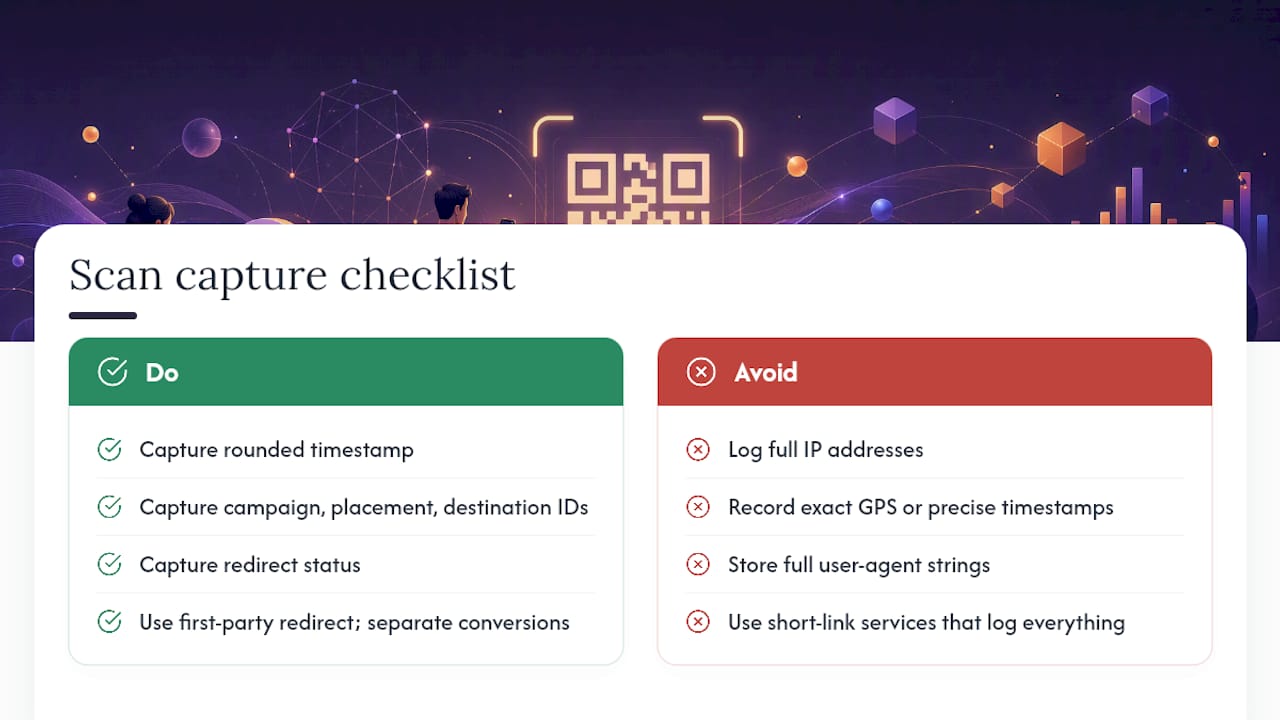
A QR scan event should carry just enough data to prove the campaign worked, and nothing that turns your redirect log into a liability. That means capturing a rounded timestamp, a campaign ID, a placement ID, a destination ID, and the redirect status, while deliberately leaving out full IP addresses, precise timestamps, device fingerprints, or the complete referrer URL.
Privacy-friendly QR tracking works best with a first-party redirect and a minimal event schema, keeping scan counts separate from conversion tracking rather than trying to do both in one system. Conversion measurement belongs on the destination page, where the actual user experience happens, not baked into the QR redirect itself.
To verify this is actually working, check two things side by side: GA4 Realtime should show the session tagged with utm_medium=qr, and your server-side (or Rdyrct) dashboard should show a matching scan row with the minimal fields above and nothing more. If your logs show raw IPs, exact GPS coordinates, or a full user-agent string, that’s excessive by any reasonable privacy standard, and it’s also risk you don’t need for campaign attribution to work.
Region-aware rules matter here too. Confirm that anything beyond basic country-level attribution, like device type or more granular location, is gated by consent or regional rules, and document the legal basis for whatever you do collect.
Short-link services that log everything and sort it out later create the exposure in the first place: platforms that store full IPs, precise timestamps, or share click records with third parties without region-aware consent handling are the pattern to avoid, not the default to accept.
Pro Tip: If you must retain any IP data at all, truncate or hash it in memory and discard the raw value immediately. Recording a coarse location like a country is almost always sufficient; recording an exact IP rarely is.
What Tools Should You Use for QR Code Testing?
You don’t need an elaborate stack to test QR codes properly, but you do need the right handful of tools mapped to the right checks.
| Test type | Verification method | Pass sign |
|---|---|---|
| HTTP redirect | curl -IL or DevTools Network tab | Single 301/302, correct Location header |
| UTM preservation | Compare destination URL to original | Every parameter present, unencoded |
| In-app browser behavior | Open link inside Gmail, Instagram, X | Parameters survive, page loads normally |
| Email wrapper links | Send test email, click tracked link | Final URL retains full UTM string |
| Print/scan test | Physical scan with iOS and Android camera | Redirect completes, GA4 event fires |
For day-to-day checks, curl or httpie handle HTTP inspection fastest. Browser DevTools cover anything visual, including redirect timing. For the in-app browser problem, tools like Playwright or Selenium let you automate a scan-and-click sequence across wrapper environments instead of testing by hand every time. GA4 Realtime remains the fastest confirmation that a scan reached analytics, and pairing it with a server-side log inspector catches anything GA4’s client-side tracking misses.
Build a lightweight automated smoke test that runs whenever a redirect target changes: check the status code, confirm the UTM string, and flag any hop count above two. Catching a broken redirect in CI beats catching it from a customer service ticket.
Common QR Code Failures and How to Fix Them
Most QR code failures trace back to one of five causes, and all five are fixable in under an hour once you know what to look for.
- Parameter stripping mid-chain: an intermediate redirect or the landing page itself drops your UTMs. Fix it by appending UTMs to the destination before shortening, and test every hop individually.
- Email or social wrappers hiding the query string: platforms like Gmail or LinkedIn sometimes encode your target URL as a wrapped parameter. Fix it by testing the link inside the actual platform, not just in a browser tab.
- Too many hops in mobile browsers: in-app browsers time out or abandon chains with four-plus hops. Fix it by removing unnecessary intermediate redirects and using a first-party branded domain.
- Overzealous privacy settings blocking useful data: some teams overcorrect and lose campaign-level attribution entirely. Fix it with a minimal, defined event schema and region-based consent gating instead of an all-or-nothing approach.
- CDN or caching layers stripping query strings: a misconfigured cache rule can silently drop parameters. Fix it by excluding redirect endpoints from caching or explicitly preserving query strings in the CDN config.
Why privacy-first testing matters
The workflow above isn’t about collecting less data for its own sake. It’s about collecting exactly enough to measure a campaign and nothing that turns a redirect log into a liability. Branded, first-party short links are the right foundation for that, not an afterthought bolted on later.
Get a Privacy-First Way to Build and Test Branded QR Codes
Running this checklist by hand works, but it’s a lot easier when your short-link platform is built for it from the start. Rdyrct gives you first-party redirects on your own branded domain, which means fewer hops, less wrapper interference, and a redirect chain that’s simple to inspect.

Rdyrct’s default logging skips full IP storage entirely, so the privacy check in step four of the testing checklist is already handled before you even run it. UTM strings pass through redirects intact, custom domains keep your branding consistent on printed materials, and the API lets you swap a redirect target on a printed QR code without reprinting anything, which matters the moment a landing page changes mid-campaign. Every redirect shows up in a dashboard built for exactly this kind of verification, so checking scan counts against your GA4 Realtime numbers takes minutes instead of a manual log pull.
If you’re setting up your first branded QR testing workflow or replacing a link shortener that logs more than you’re comfortable with, start with a free Rdyrct account and run the checklist above against your first live short link today.
Frequently Asked Questions
What is the fastest way to test a QR code before printing?
Curl the short link with -IL, confirm the status code and Location header, then scan it once and check GA4 Realtime for the matching event. That combination catches the majority of redirect and tracking failures in under five minutes.
Why does GA4 show QR traffic as Direct instead of a real source?
A scan opens a URL with no referrer, so GA4 defaults to Direct unless the URL carries UTM parameters. Adding utm_medium=qr and building a matching custom channel group fixes the misclassification.
How many redirect hops are too many for a QR code? Anything beyond two hops is worth investigating, and four or more is a real risk, since longer chains add latency and increase failure rates in mobile in-app browsers.
What data should a QR scan event actually store? Stick to a rounded timestamp, campaign ID, placement ID, destination ID, and redirect status. Avoid full IP addresses, exact device fingerprints, and complete referrer URLs, which add privacy risk without improving attribution.
Do I need separate testing for iOS and Android? Yes. In-app browsers and camera scanning behavior differ enough between platforms that a link tested only on one device can still fail on the other, particularly inside wrapped social or email apps.
Sources
- Stop Letting Your Short Links Break Privacy Laws: How To Build ‘Consent‑Safe’ Click Tracking In 2026 - Redirectmy
- How to Validate UTM Links Before Publishing — MissingLinkz