QR Code Security for Branded Links and Redirects
QR Code Security for Branded Links and Redirects

Treat the redirect layer as controlled infrastructure. That’s the core of QR code security for any brand managing short links at scale: a branded short domain, role-based access control (RBAC), HTTPS on every hop, signed redirects, revocation controls, and analytics that never touch raw IP addresses.
Before you read further, here are the three controls that matter most:
- RBAC and two-factor authentication on every dashboard account, so no single compromised credential can silently reroute a printed code
- Audit logs with user identity and timestamps on every destination change, giving you a paper trail for governance and incident response
- Revocation and expiry controls tied to a pre-written DNS kill-switch runbook, so you can pull a compromised code in minutes, not hours
Start by locking down your branded short domain and enabling 2FA on all admin seats. Everything else builds from there.
Key Takeaways
Treating the QR redirect layer as auditable, privacy-first infrastructure, with RBAC, signed redirects, and revocation controls, is the single most effective approach to QR code security for branded campaigns.
| Point | Details |
|---|---|
| Lock the domain first | Register your branded short domain, enable registrar lock, and set auto-renew alerts before any code goes to print. |
| RBAC and 2FA are non-negotiable | Limit admin seats and enforce two-factor authentication; every extra privileged account is an attack surface. |
| Audit logs enable accountability | Every destination change needs a log entry with user identity and timestamp for governance and incident response. |
| Skip IP storage in analytics | Referrer, device, and campaign tag deliver sufficient marketing signal without the compliance exposure of raw IPs. |
| Rdyrct covers the full checklist | Rdyrct provides no-IP analytics, branded QR codes, RBAC, audit logs, API access, and a self-hosting option for teams needing full data control. |
Table of Contents
- What does QR code security mean for brands managing redirects?
- What platform features should you require for secure QR codes?
- Governance and contracts: policies you must put in place before launch
- Step-by-step implementation checklist for marketing and engineering teams
- How do you harden the redirect layer at the infrastructure level?
- Monitoring, alerts, and incident response for QR programs
- Privacy-first analytics: what to collect and what to skip
- Typical costs and a realistic deployment timeline for small teams
- How Rdyrct implements these controls in practice
- Rdyrct covers this checklist from day one
- Sources
What does QR code security mean for brands managing redirects?
For brands, QR code security is not about consumer anti-phishing. It’s about controlling the redirect layer: the short domain, the dashboard that edits destinations, and the analytics pipeline that processes scan data.
Dynamic QR codes point to a short redirector that can be edited after printing, which is exactly what makes them useful and exactly what makes them a single point of failure. Static codes embed a permanent URL and break the moment that URL moves. Dynamic codes solve that, but they introduce dashboard security as a dependency.
The attack surface for the redirect layer includes:
- Unauthorized destination edits via compromised dashboard credentials
- Expired or hijacked short domains routing to untrusted content
- Unaudited redirect chains passing through intermediary domains you don’t control
- Overprivileged team members who can publish changes without review
Pro Tip: Print the branded short domain in readable text beneath every QR code. On high-stakes assets like packaging or event signage, add a one-line trust statement (“Scan safely at brand.co/promo”). It costs nothing and gives scanners a way to verify before they tap.
What platform features should you require for secure QR codes?
A platform that can’t answer “yes” to every item below is not ready for production use on printed assets.
Enterprise QR management platforms provide centralized dashboards, RBAC, audit trails, bulk generation, and version control. Those aren’t premium extras; they’re the baseline for any team managing codes that live on physical materials.
| Feature | Security goal | Governance artifact |
|---|---|---|
| RBAC with least-privilege roles | Prevent unauthorized destination edits | Role matrix with named owners |
| Immutable audit logs | Detect and attribute changes | Change log with user ID and timestamp |
| Signed/verified redirect tokens | Block arbitrary destination publishing | Signature policy document |
| HTTPS enforcement on every hop | Prevent interception in transit | TLS certificate inventory |
| Branded short domain with registrar lock | Prevent domain hijack | Domain ownership record |
| Revocation and expiry controls | Kill compromised codes instantly | Kill-switch runbook |
| Privacy-first analytics (no IP storage) | Limit data exposure | DPA and retention schedule |
Pro Tip: Limit admin seats to two or three named individuals. Every additional privileged account is an attack surface. For everyone else, viewer or editor roles with no publish rights are the right default.
Governance and contracts: policies you must put in place before launch
Technical controls fail without the organizational layer behind them. Define who can draft a redirect versus who can publish it, and map those roles to asset types. A packaging QR code needs a different approval chain than a social media link.
Before any code goes to print, your governance checklist should cover:
- Ownership assignment: every redirect has a named owner responsible for its destination and lifecycle
- Approval flow: draft → review → publish, with a second-person sign-off for high-stakes assets
- Retention policy: how long scan logs are kept, in what form, and who can access them
- DPA coverage: if you use a third-party platform, a signed Data Processing Agreement is non-negotiable before you collect any scan data
- Privacy disclosure: a short notice on printed materials or landing pages explaining what scan data is collected and why
Maintain version control on redirect destinations. A change review checklist and mandatory staging test before any update to a live printed code prevents the most common operational errors.
Pro Tip: Route destination-change webhook notifications to a dedicated security inbox and review it weekly. A change made at 2 AM on a Saturday is worth a second look.
Step-by-step implementation checklist for marketing and engineering teams
This sequence works for a new program or for hardening an existing one.
- Choose and register your branded short domain. Pick something short and recognizable. Register it with a reputable registrar and enable registrar lock immediately.
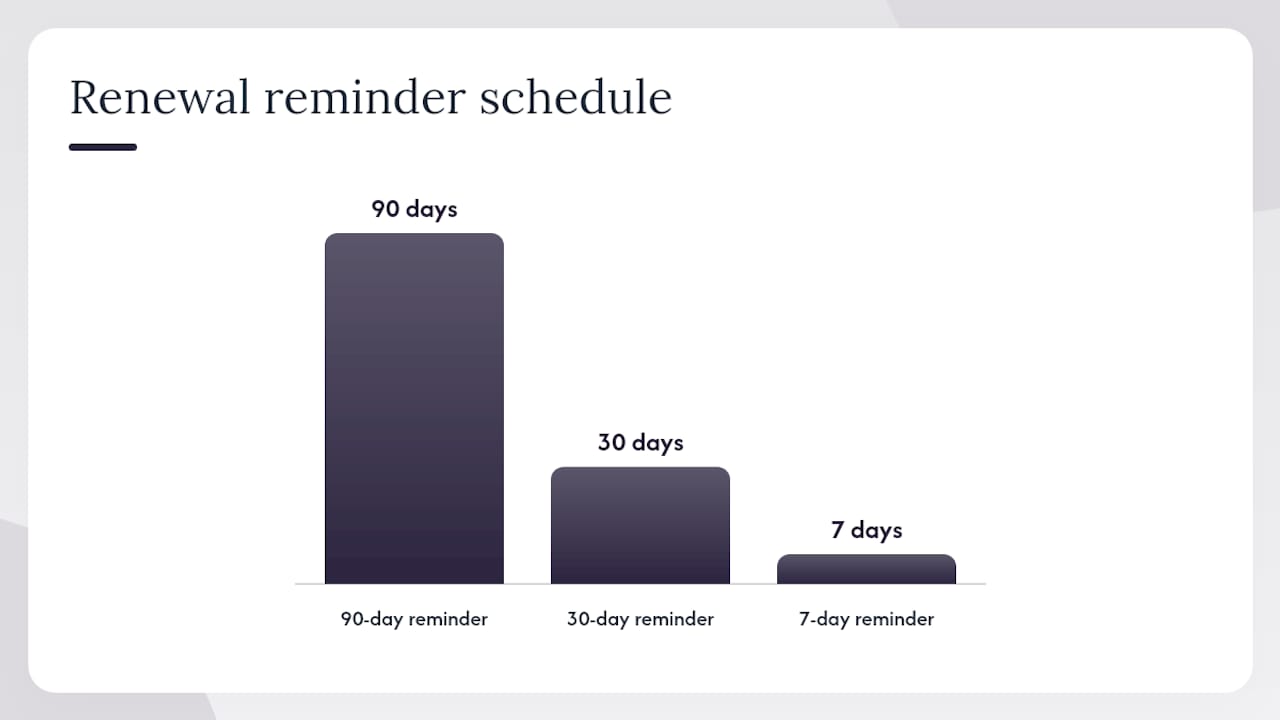
- Lock the domain and set auto-renew alerts. Expiry is one of the most common causes of redirect failure. Set calendar alerts at 90, 30, and 7 days before renewal.
- Provision TLS and monitor the certificate. Use a certificate monitoring tool to alert on expiry or unexpected changes.
- Deploy the redirect layer. Hosted SaaS or self-hosted on Cloudflare Workers; either way, treat it as critical infrastructure with uptime monitoring.
- Configure RBAC and mandatory 2FA. No exceptions for admin accounts.
- Enable audit logging and alerting. Every destination change should generate a log entry and trigger a notification.
- Run staging tests before publishing. Use
curl -L -vto inspect the full redirect chain and confirm every hop resolves to a trusted domain. - Document retention and DPA. Before any scan data flows, confirm your retention window and DPA are in place.
For campaign attribution, agree on a UTM taxonomy before launch. Consistent utm_source, utm_medium, and utm_campaign values across every code make analytics actionable and prevent the “mystery traffic” problem.
Developer tasks: certificate monitoring, redirect-chain audits, API key rotation schedule, webhook configuration. Marketer tasks: UTM naming standards, owner tagging, fallback URL policy for expired campaigns.
How do you harden the redirect layer at the infrastructure level?
Signed redirect tokens are the most underused control in this space. Use HMAC-signed target URLs or short-lived JWTs so the dashboard cannot publish an arbitrary destination without a valid server-side signature. That one control closes the gap between “someone edited the redirect” and “someone edited the redirect and it went live.”
Additional hardening steps:
- Enforce HTTPS on every redirect hop, with no HTTP fallback
- Monitor DNS and WHOIS records for your short domain; unexpected changes are an early warning sign
- Apply registrar lock and configure multi-admin expiry alerts
- Rotate API keys on a fixed schedule (quarterly is a reasonable floor) and require hardware-backed MFA for top-level accounts
- Use ephemeral tokens for time-sensitive campaigns; revoke them at campaign end rather than leaving them live
For redirect-chain auditing, run:
curl -L -v https://yourdomain.co/shortcode 2>&1 | grep -E "Location|< HTTP"
That command surfaces every hop in the chain and the HTTP status at each step. Any intermediary domain you don’t recognize is a problem. Auditing redirect chains with full hop visibility materially reduces the chance that a printed code routes through untrusted intermediate domains.
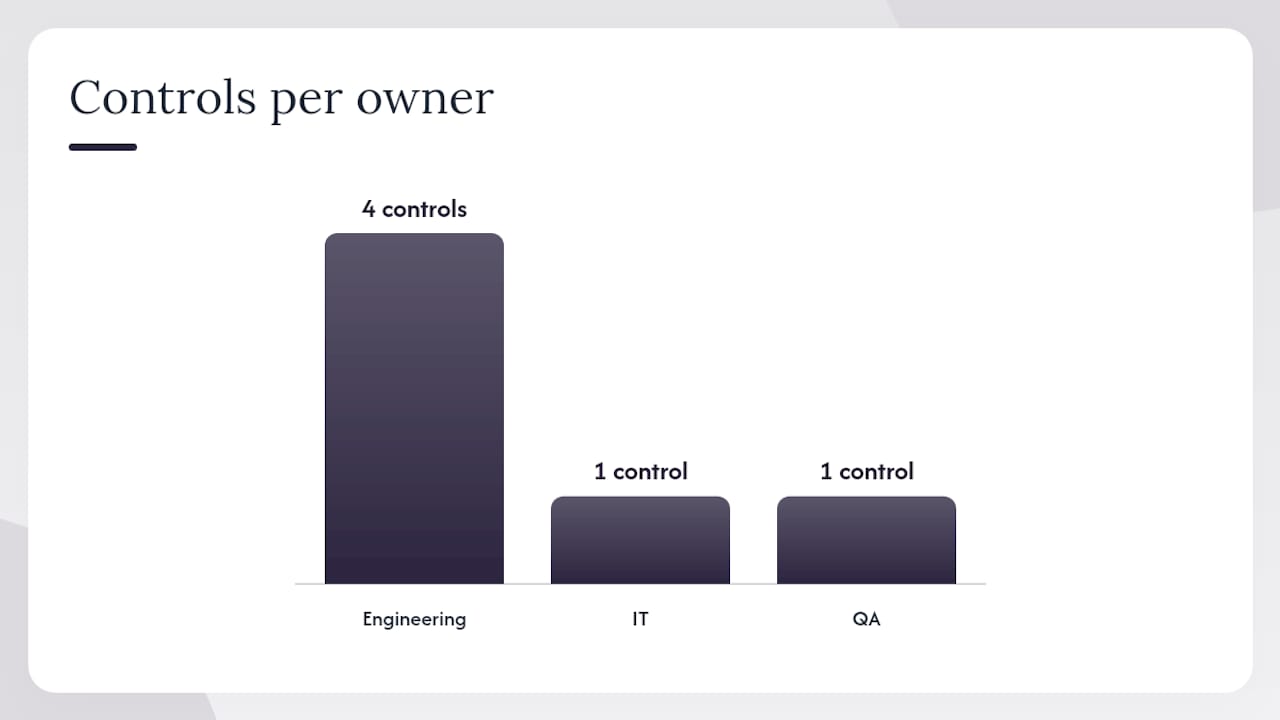
| Control | Threat mitigated | Owner |
|---|---|---|
| HMAC-signed redirect tokens | Unauthorized destination publish | Engineering |
| Registrar lock + auto-renew | Domain hijack or expiry | Engineering / IT |
| API key rotation schedule | Credential compromise | Engineering |
| Redirect-chain audit (curl) | Untrusted intermediary domains | Engineering / QA |
Pro Tip: Treat your redirector DNS zone with the same protections as your primary domain: registrar locks, multi-admin expiry alerts, and delegated recovery contacts. A hijacked short domain is indistinguishable from a hijacked main domain to your customers.
Monitoring, alerts, and incident response for QR programs
The signals worth watching are specific. A sudden scan spike on a code that’s been dormant for weeks, a destination change outside business hours, a DNS record modification, or a certificate that’s about to expire: each one is a trigger for investigation.
Set alerting thresholds and route them to a security inbox, a Slack channel, and ideally a webhook to your SIEM. The goal is that no destination change goes unnoticed for more than 24 hours.
When something does go wrong, the runbook is:
- Detect the anomaly via alert or manual review
- Revoke at the redirector or DNS level immediately
- Notify internal stakeholders and, if scan data was exposed, affected parties
- Remediate by publishing a corrected destination or a safe holding page
- Rotate all credentials that could have been involved
- Review with a written post-incident summary within 72 hours
Pre-write your “we are aware” static holding page and your DNS-level kill-switch steps before you need them. In an incident, the time you spend drafting a response page is time the compromised redirect stays live. A 15-minute prep task can cut your response time from hours to minutes.
Pro Tip: Keep the kill-switch runbook in a location that doesn’t depend on the platform you’re trying to shut down. A shared doc in a separate system, printed and filed, is not overkill.
Privacy-first analytics: what to collect and what to skip
The minimal data model that still gives you useful campaign signal: timestamp, shortened-link ID, referrer domain, device family, and campaign tag. That’s it. IP addresses add almost no marketing value and create meaningful compliance exposure, especially as US state privacy laws continue to expand.
Recommended practices:
- Never store raw IPs unless you have a specific, contractually covered reason and a DPA that explicitly covers it
- Aggregate scan counts by day, referrer, and device rather than keeping individual event rows
- Use server-side UTM forwarding to pass campaign data to your analytics or CRM without exposing raw identifiers
- Set a retention window and enforce it; 90 days covers most campaign cycles and limits long-term data risk
Cookieless analytics patterns show that aggregated, IP-free telemetry delivers sufficient signal for conversion attribution in most marketing use cases. You can measure what matters without building a surveillance log.
For printed materials, a one-line privacy notice works: “Scan data (device type, referrer) is collected to measure campaign performance. No personal data is stored.”
Typical costs and a realistic deployment timeline for small teams
Cost drivers are straightforward: custom domain registration (roughly $10–$15/year for a .co or .io), a hosted SaaS subscription, and developer hours for integration and hardening.
A quick launch for a single campaign with a branded domain and basic RBAC takes two to four weeks. An enterprise rollout with API integration, self-hosting, custom retention policies, and a full DPA review runs eight to twelve weeks. The difference is almost entirely legal review and internal approval cycles, not technical complexity.
How Rdyrct implements these controls in practice
Rdyrct maps directly to the checklist above. No IP addresses are stored; analytics cover referrer domain, device family, country, and campaign tag. Branded short domains are supported across plans, with dynamic QR code management that lets you update destinations after printing. RBAC and organization-level team controls gate who can publish changes. Audit logs track every destination edit with user identity and timestamp.
For teams that want full data sovereignty, Rdyrct’s Cloudflare Workers-compatible self-hosting option keeps the redirect layer on your own infrastructure. The Cloudflare Workers logging setup gives engineering teams the audit trail depth they need without a separate logging vendor.
A practical workflow: a marketer creates a new QR code and sets the destination. An editor reviews it. Publishing is gated by RBAC so only authorized accounts can push it live. Analytics flow in without IPs, and the team sees referrer, device, and campaign data in real time.
Pro Tip: When evaluating any vendor, ask for a scrubbed sample of their log format, a DPA template, and confirmation that destination-change webhooks are available. A vendor that can’t produce all three in under 24 hours is not ready for production use on printed assets.
Rdyrct covers this checklist from day one
Rdyrct gives marketing teams and developers a privacy-first link platform that checks every box in this guide: no IP storage, branded QR codes, RBAC, audit logs, API access, and a self-hosting path for teams that need full data control. There’s no long-term contract required to start, and the free tier lets you test the core workflow before committing.

Pricing scales from a free forever plan through hobby and pro tiers, with branded domains and longer analytics retention unlocking at paid levels. For most small teams, the mid-tier plan covers everything in this checklist. For developers who want to run the redirect layer on their own Cloudflare account, the open-source self-hosted option is available without a subscription.
Start a free trial or deploy the self-hosted version at Rdyrct and have your branded short domain and RBAC configured within a day.
Sources
- Best Practices for Managing Dynamic QR Code Campaigns
- QR Code Security Best Practices for Scanners and Brands in 2026 | Fast QR Blog