How to Generate Bulk QR Codes Fast and Safely
How to Generate Bulk QR Codes Fast and Safely

The fastest, lowest-risk approach to bulk QR code generation is a CSV-driven workflow: one URL or data value per row, a single design applied across the batch, and a ZIP of named image files downloaded at the end. No manual clicking, no one-by-one exports.
The core trade-off: Static QR codes generate instantly and cost nothing, but the destination is locked forever. Dynamic QR codes cost more, but you can update the URL after printing and get per-code analytics — which matters enormously for any campaign you plan to measure or adjust.
Choose static when the data is permanent (Wi-Fi credentials, vCard contacts, fixed product pages). Choose dynamic when the destination might change or when you need to track scans by code.
Key Takeaways
Bulk QR code generation works best when you combine a clean CSV template, a privacy-aware generator, and dynamic short links that keep destinations editable after printing.
| Point | Details |
|---|---|
| Prepare a clean CSV | Include url and filename columns, save as UTF-8, and remove blank rows before uploading. |
| Choose format by use case | Use SVG for large-format print, PNG at 300+ DPI for standard labels; set ECC to H when adding a logo. |
| Validate before printing | Test-scan at least 10 codes from across the batch on both iOS and Android before committing to a full print run. |
| Use dynamic QR for campaigns | Dynamic codes let you update destinations without reprinting and provide per-code analytics for campaign measurement. |
| Rdyrct for branded batches | Rdyrct combines branded short links, customizable QR codes, privacy-first analytics, and API access in one platform. |
Table of Contents
- What a good bulk QR code generator must support
- How bulk QR generation actually works
- Step-by-step: generate 1,000 QR codes from a CSV
- When should you use an API instead of a CSV upload?
- Scannability and printing best practices
- Why dynamic QR codes with branded short links are the smarter default
- Rdyrct gives you branded QR codes with privacy-first analytics
- Sources
What a good bulk QR code generator must support
Not every tool that calls itself a “bulk” generator actually handles large batches well. Before committing to any platform, run through this checklist.
Import formats
- CSV and XLSX are the baseline. Each row maps to one QR code; a
urlorvaluecolumn holds the encoded content, and afilenamecolumn controls the output file name. - TXT (one value per line) works for simple URL lists but gives you no filename control.
- Google Sheets links are offered by some tools and let you pull live data without exporting a file first.
Design controls applied batch-wide
- Output size (pixels for PNG, or vector for SVG)
- Error-correction level (L, M, Q, or H) — higher levels recover data when a code is damaged or partially obscured by a logo
- Foreground and background color
- Logo or icon overlay (requires ECC level Q or H)
- Output format: PNG for labels and web, SVG for large-format printing
Export and file naming
- ZIP download containing all images
- Per-file names that match a column in your spreadsheet, so you can map images back to rows without guessing
- Optional PDF label sheets for direct printing
Capacity and pricing
Free barcode and QR generator tools vary widely in batch limits and features. A typical free tier caps batches at around 100 codes; paid tiers unlock larger single-job sizes, email delivery of completed ZIPs, and API access. Some platforms distinguish free static generation from paid dynamic generation, where dynamic codes support editable destinations and per-code analytics.
Security and privacy
Client-side generators (built on WebAssembly or JavaScript) render every code inside your browser and never upload your data to a server. That matters when your CSV contains confidential serial numbers, attendee lists, or internal asset IDs. Server-side tools are fine for public URLs but require you to trust the provider’s data-handling policy.
Workflow friendliness
Look for a preview or validation step before generation, a downloadable CSV template, and API or webhook support if you need to automate recurring batches.
Pro Tip: Download the tool’s sample CSV template before building your own spreadsheet. Column names are often case-sensitive, and a mismatch between your header and the expected field name is the most common reason a batch fails silently.
How bulk QR generation actually works
Understanding the data flow helps you prepare inputs correctly and avoid surprises at export time.
| Layer | What happens | What you control |
|---|---|---|
| Input | Each spreadsheet row becomes one QR code | URL, text, vCard, Wi-Fi, phone number per row; filename column |
| Options | Design settings applied to the whole batch | ECC level, image size, margin/quiet zone, logo, output format |
| Processing | Codes rendered client-side (browser/Wasm) or server-side | Choice of tool; client-side keeps data local |
| Output | ZIP of named images, optional PDF sheets, per-code metadata | File naming convention, format (PNG/SVG), label layout |
The processing layer is where tools diverge most. Client-side rendering keeps the input data on your device, which is the right call for confidential payloads. Server-side rendering is faster for very large batches and often supports async job queuing: you submit the job, the server renders in the background, and you receive a download link or email when it finishes.

QR codes are two-dimensional matrix barcodes capable of encoding several thousand characters. The four error-correction levels (L, M, Q, H) determine how much of the code can be damaged or obscured before it becomes unreadable.
Step-by-step: generate 1,000 QR codes from a CSV
1. Prepare your spreadsheet
Your CSV needs at minimum two columns: one for the encoded value (typically url) and one for the output filename (filename). Save as UTF-8 to handle international characters and special symbols without corruption.
| filename | url |
|---|---|
| product-001.png | https://example.com/p/001 |
| product-002.png | https://example.com/p/002 |
| event-ticket-0001.png | https://events.example.com/t/0001 |
Keep filenames short, lowercase, and hyphen-separated. Avoid spaces and special characters in filenames even if the tool claims to support them — printers and CMS platforms often choke on them downstream.
2. Upload and validate
Most tools show a preview of the first few codes before generating the full batch. Use it. Check that:
- No rows are blank or contain whitespace-only values
- URLs are well-formed (start with
https://) - Filenames are unique across every row
3. Set batch design options
- Size: 300×300 px minimum for standard labels; 600×600 px for anything printed larger than a business card
- ECC level: Use M for plain URLs, Q or H if you’re adding a logo
- Format: PNG for label sheets and web uploads; SVG if the codes will be scaled up for posters or signage
- Quiet zone: Keep at least four modules of white space around every code
4. Export and match back
Download the ZIP, unzip into a working folder, and spot-check filenames against your original CSV. Scan five to ten codes from different parts of the batch with at least two different phone models before sending anything to print.
Pro Tip: If you’re dropping QR images into a label template (Avery, Canva, InDesign), name your files to match the merge field in the template. That one naming decision saves hours of manual placement.
For readers deploying QR codes in service or queue management contexts, a QR code waitlist setup follows a very similar CSV-driven workflow and is worth reviewing for deployment patterns.
When should you use an API instead of a CSV upload?
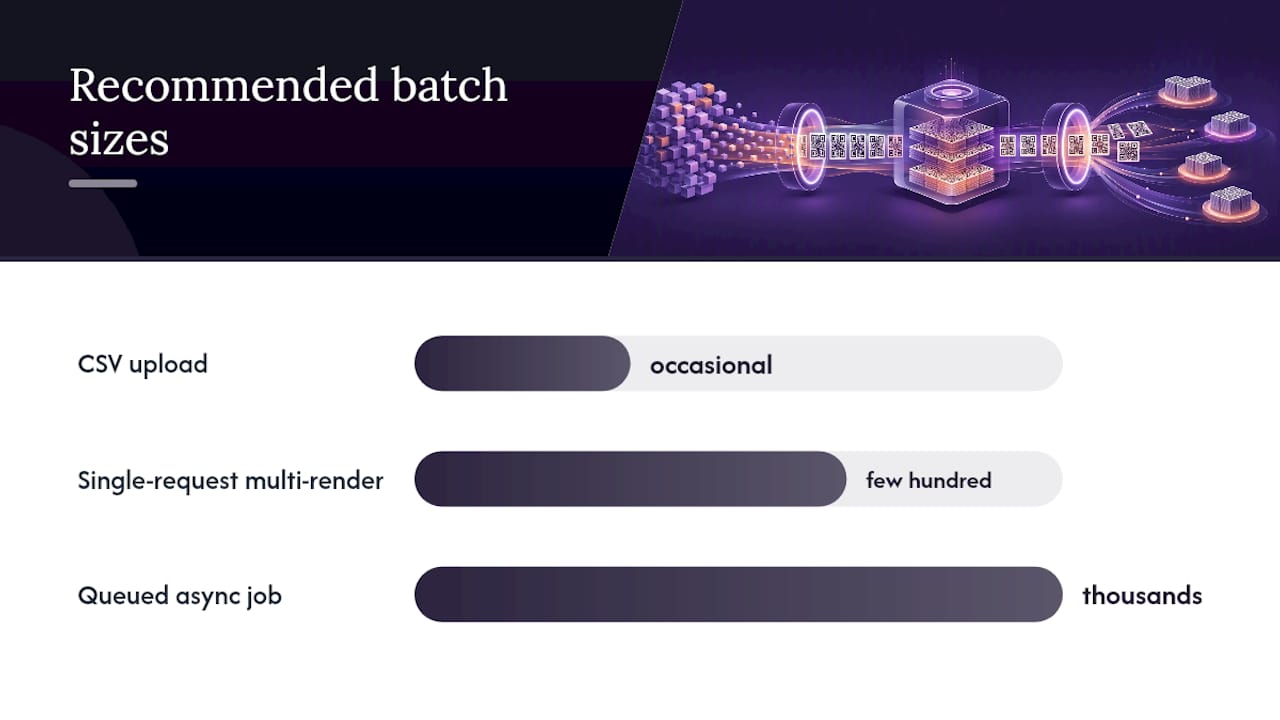
The browser-based CSV workflow is fine for occasional batches. When you’re generating codes on a schedule, integrating with a CMS, or triggering generation from a CI/CD pipeline, an API is the right tool.
Common API patterns you’ll encounter:
- Single-request multi-render: Send a JSON array of values, receive a ZIP in the response. Works well up to a few hundred codes per request.
- Queued async job: Submit the batch, receive a job ID, poll for status or wait for a webhook callback. Better for thousands of codes or when rendering time is unpredictable.
Practical integration notes worth knowing before you start:
- Authentication is almost always an API key in the request header
- Payload size limits vary; split very large batches into chunks if the API enforces a per-request cap
- For sensitive payloads (serial numbers, internal IDs), prefer a client-side library or a self-hosted solution over a third-party API
- Returning a ZIP is more efficient than returning per-code URLs when you need all images locally
For teams integrating bulk generation into broader tech stacks, AI and automation integrations can connect QR generation pipelines to marketing automation and data workflows.
Scannability and printing best practices
A large print run of unscannble QR codes is an expensive mistake. These rules prevent it.
- Minimum physical size: 2 cm × 2 cm (roughly 0.8 in × 0.8 in) for codes scanned at arm’s length. Increase to 4 cm × 4 cm or larger for codes meant to be scanned from a distance of 1 meter or more.
- Contrast: Dark modules on a light background, always. The contrast and quiet zone guidance from barcode design standards recommends a minimum 70% contrast ratio between foreground and background. Avoid placing codes on busy backgrounds, gradients, or textured surfaces.
- Quiet zone: A minimum four-module-wide white border around the entire code. Cutting into the quiet zone is one of the most common causes of scan failure in printed materials.
- Error correction and logos: Adding a logo reduces the scannable area. Use ECC level H (30% recovery) when overlaying any graphic. Higher ECC also increases module density, which means the code needs to be printed larger to remain scannable.
- File format for print: SVG scales without quality loss. For raster exports, use at least 300 DPI. A 600×600 px PNG printed at 300 DPI produces a 2-inch square code — fine for most labels.
- Pre-print validation checklist: Test-scan a representative sample (at least 10 codes from different parts of the batch) on both iOS and Android. Print a proof sheet at final size before committing to the full run. Verify that filenames on the proof sheet match the source CSV rows.
For color choices that maintain scannability, Rdyrct’s guide on QR code color design covers contrast ratios and safe color combinations in detail.
Statistic callout: QR codes support four error-correction levels — L (7% recovery), M (15%), Q (25%), and H (30%) — meaning a code set to level H can remain fully scannable even when nearly a third of its surface is covered or damaged.
Why dynamic QR codes with branded short links are the smarter default
Most bulk QR tutorials stop at “generate and download.” That’s fine for a one-time job. For any campaign you’ll run more than once, or any printed material that might outlast its original destination URL, static codes are a liability.
Dynamic QR codes point to a short link that you control. Change the destination in your dashboard, and every printed code instantly points somewhere new — no reprint, no waste. Per-code analytics tell you which specific code drove which scan, which location performed, and which format got ignored. That’s the kind of data that makes a second campaign smarter than the first.
Privacy matters here too. Client-side generation keeps your input data off third-party servers. And when it comes to tracking scans, privacy-respecting analytics (no IP storage, no cross-site fingerprinting) give you the campaign data you need without the compliance exposure you don’t.
Branded short links add one more layer: a recognizable domain in the QR code’s encoded URL builds trust with scanners who preview the link before opening it. Combined with UTM parameter management, you get clean attribution without ugly tracking strings visible in the URL.
Rdyrct gives you branded QR codes with privacy-first analytics
Generating a batch of static codes is easy. What’s harder is managing where those codes point six months later, knowing which ones actually drove traffic, and doing all of it without handing your audience’s data to an ad network.

Rdyrct handles the full workflow: branded short links that encode cleanly into QR codes, customizable branded QR designs, privacy-first analytics (no IP storage, full referrer and device breakdowns), UTM parameter management, and API access for scheduled or programmatic batches. The free tier gets you started; paid plans unlock higher batch limits, custom domains, longer analytics history, and team roles for agency or multi-brand workflows. For readers managing event tickets, product labels, or campaign landing pages at scale, the API makes recurring exports straightforward without manual CSV uploads each time. Sign up at rdyrct.com, grab your API key from the dashboard, and check the documentation to see which plan fits your batch size.