Best QR Code Generators for Privacy and Branded Links
Best QR Code Generators for Privacy and Branded Links

For privacy-first, branded, trackable QR campaigns, the right choice is a dynamic QR provider that pairs IP-non-storing analytics with custom domains, real-time click feeds, and reliable redirects. Rdyrct delivers exactly that combination. Here is what that looks like in practice:
- Dynamic redirects: change the destination URL without reprinting the code
- Real-time analytics: live click feeds with country, device, and referrer data
- Custom domains: branded short links that carry your identity, not a generic shortener’s
- Privacy by design: no IP address storage, with a clear data-retention policy
- API and bulk generation: programmatic QR creation and CSV import for scale
If you need tracking, attribution, or the ability to fix a broken link after print, a static code simply will not do the job.
Table of Contents
- Why do dynamic QR codes matter for professional campaigns?
- What should you check before choosing a QR code platform?
- How does Rdyrct meet the checklist?
- How to create, brand, and deploy a trackable QR code
- How should you match your plan to your campaign scale?
- What privacy and compliance checks should you run before launch?
- What are the design and export rules for scannable QR codes?
- Key Takeaways
- The case for privacy-first QR analytics
- Rdyrct gives you privacy-first QR codes without the enterprise price tag
- Useful sources
Why do dynamic QR codes matter for professional campaigns?
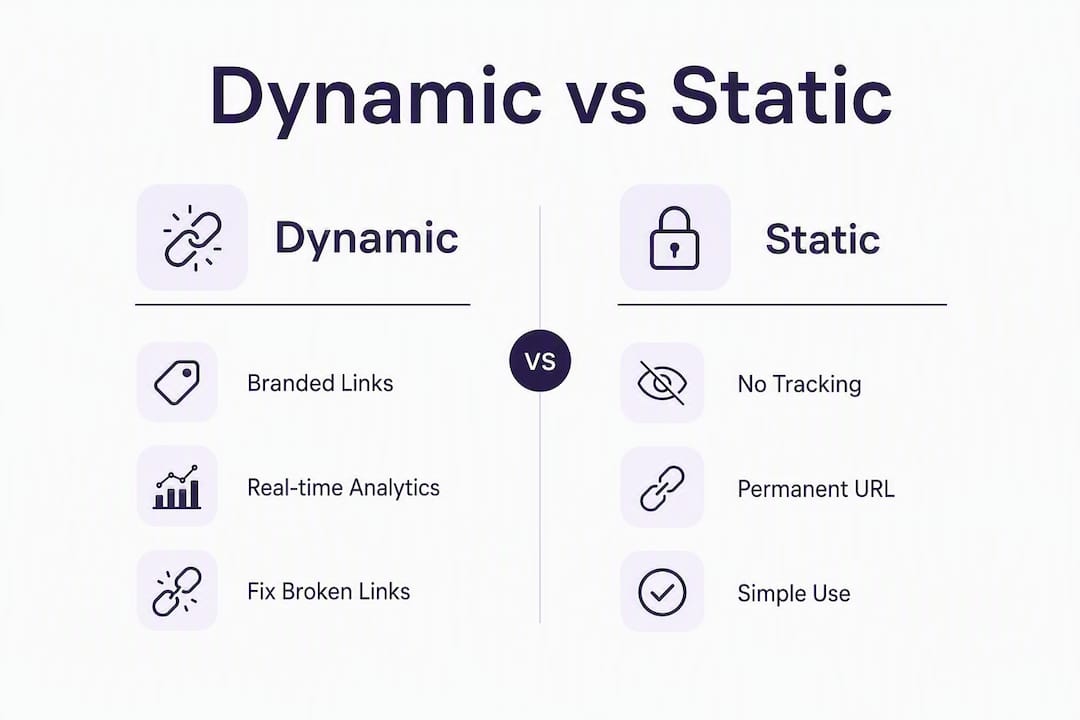
Static QR codes are fixed at creation. They point to one URL forever, and they record nothing. No scan counts, no device data, no geography. For a business card or a one-time flyer, that is fine. For any campaign where you need attribution or the ability to course-correct, static codes are a dead end.
Dynamic codes route through a redirect service. That single architectural difference is what makes tracking possible. When someone scans, the redirect layer captures the event before forwarding the user to the destination. You get:
- Live click feeds showing scans as they happen
- Geographic data at the country level (and GPS-level on enterprise tiers)
- Device and OS breakdowns so you know whether your audience is on iOS or Android
- Referrer and UTM capture for campaign attribution
- Time-series reports to spot peaks and drop-offs
The redirect layer also means you can swap the destination URL at any time. Print 10,000 labels pointing to a product launch page, then redirect them to a support page after launch. No reprint.
Statistic: Comparative analysis confirms static generators provide zero tracking capabilities, while dynamic platforms deliver geographic, device, and time-series reporting alongside editable redirects.
Pro Tip: Before committing to any platform, scan a test code and check whether analytics appear in the dashboard within 60 seconds. A platform that claims “real-time” but shows a 15-minute delay is not real-time.
What should you check before choosing a QR code platform?
Use this checklist to eliminate options fast. Any platform that fails more than two of these items is the wrong tool for a professional campaign.
Core functionality:
- Dynamic redirect with editable destination URLs
- Live click feeds (sub-minute latency)
- Geo, device, and referrer analytics
- Custom or branded domain support
- API access and bulk CSV generation
- SVG/PDF/EPS export for print
Operational reliability:
- Documented SLA or uptime commitment
- Redirect health monitoring
- Role-based access and team/org management
Privacy and compliance:
- Explicit IP non-storage or strict retention limits
- Published privacy policy covering scan data
- Data-processing addendum available on request
- Self-hosting or client-side generation option
Vendor questions worth asking on a demo or RFP:
- Where is scan data stored, and for how long?
- Do you store raw IP addresses, or only derived attributes like country?
- What is your documented uptime SLA for redirects?
- Can I bring my own domain, and is SSL included?
- Is bulk CSV generation available on my target plan?
On pricing: enterprise platforms add bulk CSV workflows, compliance certifications (SOC 2, ISO, HIPAA), and retargeting integrations that design-first tools lack. If you do not need those, you are overpaying. A mid-tier dynamic platform covers most recurring SMB campaigns without the compliance overhead.

How does Rdyrct meet the checklist?
Rdyrct maps directly to every item above. Here is the feature-by-feature picture:
- Dynamic redirects: every short link is a live redirect; change the destination from the dashboard at any time without touching the QR code
- Live click feeds: real-time analytics covering country, referrer, and device, with no IP address stored at any point
- UTM builder: built-in UTM parameter construction for campaign tracking without manual URL editing
- Custom domains and branded QR codes: bring your own domain; QR codes carry your brand, not a generic shortener subdomain
- API and bulk generation: programmatic QR creation via documented API; CSV import for high-volume label and packaging workflows
- Role-based access and organizations: assign team roles, manage permissions, and keep campaigns organized across clients or departments
- Redirect health monitoring: link activity and health monitoring so you catch a broken redirect before your audience does
- Free forever plan: a no-cost entry tier, with paid upgrades that unlock higher limits, longer analytics history, and advanced features
The open-source self-hosted option is worth noting for teams with strict data-residency requirements. Running Rdyrct on Cloudflare means scan data never leaves your own infrastructure.
Pro Tip: When migrating existing short links or QR codes to a new platform, keep the old redirect active for at least 30 days and monitor for residual traffic before decommissioning. Printed materials in the field outlast your campaign calendar.
How to create, brand, and deploy a trackable QR code
Follow these steps in order. Skipping the test phase (step 4) before print is the most common and most expensive mistake.
- Register your custom domain and confirm SSL is active. A branded domain without HTTPS will trigger browser warnings on some devices.
- Create your campaign in the dashboard. Set UTM parameters now, before generating the link, so every scan carries attribution from day one.
- Generate the dynamic short link and branded QR code. Download in SVG for print or high-resolution PNG for digital placements.
- Test scan feeds and analytics. Scan from at least two devices (iOS and Android), check that click events appear in the live feed within 60 seconds, and verify geo and device data are populating correctly.
- Bulk generation or CSV import for label and packaging runs. Use the API or CSV workflow to generate codes at scale and match each code to its destination URL.
- Set role permissions and team access before handing off to a print vendor or agency. Limit who can edit redirect targets.
- Deploy to print and monitor. Watch the live click feed after launch. Set up redirect health alerts so a broken link surfaces immediately.
For developers, the Rdyrct API supports programmatic QR generation: pass the destination URL and domain parameters, receive the QR asset and short link in the response. Verify webhook payloads or poll the analytics endpoint to confirm live click data is flowing into your own systems.
Pro Tip: Before mass production, run a preflight: minimum 2 cm × 2 cm physical size, high-contrast dark module on a light background, a quiet zone of at least four modules on all sides, and vector export confirmed. Test the printed proof under fluorescent lighting and at the intended scan distance with a device in low-signal mode.
How should you match your plan to your campaign scale?
Pick the tier that covers your actual needs, not the one with the most features on the sales page.
- Free or hobby tier: single campaigns, personal projects, or testing a new workflow. Static or basic dynamic codes with limited analytics history. Fine for low-stakes use where redirect reliability is not critical.
- Mid-tier (SMB recurring campaigns): affordable dynamic platforms with branded domains and analytics cover most recurring marketing needs without enterprise pricing. This is where most marketing teams should land.
- Enterprise tier: bulk CSV generation, SLA guarantees, compliance certifications (SOC 2, HIPAA), and retargeting/pixel integrations. Required for regulated industries, high-volume packaging, or campaigns where a redirect outage has real revenue consequences.
Features that typically push you into the next tier: custom domain support, API rate limits above a few hundred calls per day, analytics retention beyond 30–90 days, and compliance documentation. Watch for hidden costs around custom domain setup fees and pixel or retargeting integrations, which are sometimes add-ons even on enterprise plans.
Trial on realistic volumes. A plan that handles 500 scans per month in testing may throttle at 50,000 in production.
What privacy and compliance checks should you run before launch?
Verify these before you collect a single scan event.
- Does the vendor explicitly state it does not store raw IP addresses?
- Is the data-retention period documented, and is it short enough for your compliance posture?
- Can analytics be exported in aggregated form, without user-level identifiers?
- Is a data-processing addendum available for enterprise or regulated use?
- Are access controls and audit trails in place for scan data?
For U.S. teams, the California Consumer Privacy Act (CCPA/CPRA) requires that businesses disclose what personal data they collect and give California residents the right to opt out of its sale. If your QR analytics pipeline touches IP addresses or device fingerprints, that data may qualify as personal information under CCPA. Aggregated, non-IP analytics sidestep most of this exposure.
Client-side generation is worth considering for static use cases where no scan tracking is needed: code generation happens in the browser, and no creation or scan data reaches the vendor’s servers. For dynamic tracking, self-hosting is the equivalent control.
Pro Tip: Request a written privacy policy excerpt and a DPA during vendor evaluation, not after contract signing. A vendor that cannot produce either within 48 hours is a procurement risk.
What are the design and export rules for scannable QR codes?
Use vector exports (SVG, PDF, or EPS) for any print application. High-resolution PNG works for digital placements. SVG and native app exports are the standard for packaging and large-format print because they scale without rasterization artifacts.
Design checklist:
- Minimum physical size: 2 cm × 2 cm for standard scan distances; larger for signage viewed from more than 1 meter
- Quiet zone: at least four module widths of clear space on all sides
- Contrast: dark modules on a light background; avoid low-contrast color combinations
- Logo placement: center logos occupy no more than 30% of the code area; test that the code still scans after placement
- Fallback: print the short URL in small text near the code for users whose camera app struggles
For print production, deliver files in CMYK color mode. RGB files converted at the printer can shift contrast enough to affect scannability. SVG/PDF/EPS files preserve vector quality through the RIP process; raster PNG files should be at minimum 300 DPI at final print size.
Design-oriented tools like Canva’s QR feature offer dynamic QR creation with scan analytics at Business and Enterprise tiers, which suits teams already working in that design environment. For static codes without analytics, Adobe Express produces clean, non-expiring codes suited to permanent signage.
Pro Tip: Send a physical test print to the actual production facility and scan it under fluorescent lighting at the intended viewing distance before approving the full run. Proof-on-screen and proof-in-hand are not the same thing.
Key Takeaways
Dynamic QR codes with branded domains, real-time analytics, and explicit IP non-storage are the only credible choice for professional campaigns that need tracking, attribution, and the flexibility to update destinations after print.
| Point | Details |
|---|---|
| Dynamic over static | Static codes provide zero tracking; dynamic codes enable live analytics, geo/device data, and editable redirects. |
| Privacy verification first | Confirm IP non-storage, retention limits, and DPA availability before collecting any scan data. |
| Match plan to scale | Free tiers suit testing; mid-tier covers most SMB campaigns; enterprise is for bulk CSV, SLA, and compliance needs. |
| Test before printing | Scan from iOS and Android, verify live feed latency, and run a physical proof before mass production. |
| Rdyrct covers the checklist | Rdyrct provides privacy-first analytics, branded domains, dynamic QR codes, API, and a free forever plan. |
The case for privacy-first QR analytics
The conventional wisdom in QR marketing is that more data is always better. More granular tracking, more integrations, more retargeting pixels. That framing pushes teams toward enterprise platforms they do not need and into data practices that create real compliance exposure.
The smarter position: collect what you can actually use. Country, device, and referrer data answer the questions most campaigns actually ask. Raw IP addresses answer almost none of them, and storing them creates CCPA obligations, breach risk, and vendor lock-in on data you never needed.
Platforms that skip IP storage are not making a sacrifice. They are making a design choice that simplifies compliance, reduces liability, and still delivers the attribution data that matters. For regulated industries, that choice is not optional anyway.
The other underrated factor is redirect reliability. A QR code on 50,000 product packages is a permanent infrastructure dependency. A platform with no documented SLA is a risk you are absorbing silently. Ask for the uptime number before you print.
Rdyrct gives you privacy-first QR codes without the enterprise price tag
Most QR platforms make you choose between privacy and features. Rdyrct does not. You get branded short links, customizable QR codes, live click feeds, country/device/referrer analytics, and a UTM builder, all on a platform that never stores IP addresses. The free plan at Rdyrct covers single campaigns and testing; paid tiers unlock custom domains, API access, bulk generation, and longer analytics history as your needs grow. The open-source self-hosted option is there if data residency is non-negotiable.

Start with the free plan, connect your domain, and generate your first branded QR code in under five minutes. Visit rdyrct.com to see pricing and documentation.
Useful sources
Use these to verify vendor claims, run technical tests, and complete pre-print checks.
- Rdyrct documentation and API reference — privacy policy, API docs, and bulk generation guides for Rdyrct’s hosted and self-hosted options
- Fit Small Business: QR code generator reviews — SMB-focused pricing scenarios and cost guidance
- CertiCerts: offline QR verification and wallet cards — printable wallet cards, offline scanning workflows, and verification materials for regulated or field deployments