Stop Losing Clicks: UTM for Social Media for Social Teams
Stop Losing Clicks: UTM for Social Media for Social Teams
UTM parameters are the tags you append to social links so GA4 and similar analytics platforms can attribute traffic by platform, campaign, and creative. The core best practice: tag every link you control and enforce a lowercase, social-first naming convention across teams. This guide covers the five parameters, a build-and-verify workflow, platform quirks on LinkedIn and Meta, GA4 reporting steps, and where a tool like Rdyrct fits into a privacy-conscious tagging process.
TL;DR:
- Using consistent lowercase values for utm_source and keeping campaign names stable across campaigns prevents data fragmentation and misattribution in GA4.
- Tagging every social link, including bio URLs and Stories, is essential to accurately measure social channels’ contribution to conversions and revenue.
- Building UTM links should involve a predefined naming guide, dynamic macro support, and post-build verification to ensure data integrity before publishing.
- Verifying that shortened links preserve UTMs and confirming their proper reporting in GA4 helps prevent data loss caused by redirects or platform-specific rewrites.
- Automating UTM generation through templates, dynamic platform tokens, and integrated scheduling minimizes errors and ensures consistent tracking across multiple campaigns.
Table of Contents
- What Are UTM Parameters and How Does Analytics Capture Them?
- Why UTMs Matter for Social Teams
- The Five UTM Parameters, Applied to Social
- How to Build UTM Links Without Breaking Your Data
- Platform-by-Platform Notes for Tagging Social Links
- Governance: Keeping UTM Data Clean Across a Team
- Shortening, Redirects, and a Pre-Publish Checklist
- Reading UTM Data in GA4 and Acting on It
- When a Privacy-First Shortener Fits Your Tagging Workflow
- Automating UTM Management Across Multiple Campaigns
- Author Perspective: UTM Ops as Social Ops, Not an Analytics Tax
- Try Rdyrct for Tagged, Privacy-Friendly Short Links
- Sources
- FAQ
What Are UTM Parameters and How Does Analytics Capture Them?
UTM parameters are query-string variables appended to a URL, and analytics tools parse them the moment a session starts, which is what lets a platform log a click as coming from a specific campaign rather than lumping it into generic “social” traffic, as Wikipedia’s overview of UTM parameters explains.
Platforms add their own tokens on top of this. Facebook appends fbclid, LinkedIn appends li_fat_id. These are useful for in-platform ad reporting, but they aren’t a substitute for UTMs when you need one consistent view across channels in GA4, since platform click IDs stay siloed inside each network’s own reporting.
A few behaviors trip people up:
- Shorteners and link-in-bio tools can strip or reorder query strings if they aren’t built to preserve them.
- Some in-app browsers (Instagram, TikTok) rewrite referrer data even when UTMs survive intact, so the referrer field and the UTM fields can disagree.
- A UTM with no matching campaign in your registry still gets logged. GA4 will just report it under whatever raw string you typed.
Why UTMs Matter for Social Teams
Without UTMs, most social clicks land in GA4 as “referral” or worse, “direct,” which erases the story of what actually drove the visit. Tagging every link is how you prove social’s contribution to pipeline and revenue instead of guessing at it.
UTMs also let you answer questions that platform-native dashboards can’t:
- Which post format drives more sign-ups, a carousel or a single image, using
utm_contentto separate the two. - How much of your conversions come from organic posting versus paid boosts, using
utm_mediumto split them cleanly. - Whether a bio link, a Stories swipe-up, or a pinned comment link performs differently, since each can carry its own tag.
Skip tagging on bio links or short-lived Story placements and you’ll watch real traffic disappear into your “unassigned” or “direct” bucket. That’s traffic you paid time or money for and can no longer defend in a budget review.
The Five UTM Parameters, Applied to Social
Every UTM link needs the same five fields, and social teams get the most value when they standardize the values instead of improvising per campaign. The core UTM structure breaks down like this:
- utm_source identifies the platform. Use a fixed, lowercase name per network:
linkedin,facebook,instagram,x,tiktok. Never mixfbandfacebookfor the same channel. - utm_medium identifies the channel type, not the platform. Use
socialfor organic posts andpaid-social(orcpcif that matches your ad naming elsewhere) for paid placements. - utm_campaign identifies the initiative. Keep it short and stable across the campaign’s life, like
q3-webinar-launch, not a string that changes every time someone edits a post. - utm_content identifies the specific creative or post, which is essential for A/B testing formats, headlines, or thumbnails, as university tracking guidance recommends.
- utm_term is optional on social. Some teams repurpose it for an audience segment (
utm_term=smb-audience) rather than a keyword, since social doesn’t have search terms in the traditional sense.
An organic LinkedIn post might carry:
?utm_source=linkedin&utm_medium=social&utm_campaign=q3-webinar-launch&utm_content=carousel-v1
A paid Instagram Story ad for the same campaign might carry:
?utm_source=instagram&utm_medium=paid-social&utm_campaign=q3-webinar-launch&utm_content=story-swipe-v2
How to Build UTM Links Without Breaking Your Data
Building tagged links well is less about the tool and more about the sequence. Skip a step and you end up with inconsistent data three campaigns later.
- Lock a naming cheat sheet first. Agree on the exact lowercase values for source, medium, and campaign slugs before anyone builds a single link.
- Use a UTM builder or platform dynamic macros. LinkedIn supports dynamic tracking parameters at the campaign and creative level, letting you insert tokens like campaign or creative name that get substituted automatically before the ad serves, according to Microsoft Learn’s LinkedIn documentation. Meta ad platforms offer similar dynamic tokens.
- Shorten only after tagging. Confirm the shortened link’s redirect preserves the full query string, not just the base URL.
- Log the final tagged URL in a shared registry. A spreadsheet or a tool works, as long as one person can audit it.
- Assign an owner and automate what you can. Someone should be accountable for catching drift before it reaches the publishing calendar.
Pro Tip: When a platform offers dynamic macros, put the token in the ad’s URL parameter field rather than typing a full query string into the destination URL. Doing both at once is how you end up with a duplicated question mark and a broken link.
Platform-by-Platform Notes for Tagging Social Links
Each network handles UTMs slightly differently, and the differences matter once you’re running the same campaign across five of them.
- Meta (Facebook and Instagram): Use the URL parameters field in Ads Manager rather than appending a full string to the destination URL. Adding a stray question mark on top of the platform’s own token structure is a common way tracking breaks. How a platform like Meta structures its dynamic URL parameters is worth understanding before you set up your first campaign.
- LinkedIn: Campaign-level dynamic parameters or static UTMs both work, but LinkedIn has no direct equivalent to Google’s
gclid, which makes UTMs the primary way to attribute LinkedIn traffic in GA4. - Instagram and TikTok: Clickable links are limited to bios, Stories, and a handful of other placements, so tag every one of them since you don’t get many chances.
- X and YouTube: Description and pinned-comment links should carry the same campaign tags as your other channels, kept consistent through the shortener you use.
Always verify the tag survives the platform’s own redirect shim (fbclid, li_fat_id) before trusting the data.
Governance: Keeping UTM Data Clean Across a Team
Most UTM data doesn’t fail because the concept is hard. It fails because five people built links five different ways over six months.
- Enforce lowercase-only values everywhere. GA4 treats
Facebook,facebook, andFBas three separate sources, fragmenting a single channel into noise, per practical UTM setup guidance. - Use hyphens, not underscores or spaces, inside values, and keep campaign slugs stable for the life of the campaign.
- Maintain one source-of-truth registry with edit permissions restricted to a small group, plus an onboarding template new hires use on day one.
- Decide upfront whether you’re using human-readable slugs or numeric IDs, and archive finished campaigns instead of letting old tags linger active.
Pro Tip: Teams that build UTM generation into their content calendar, rather than treating it as a separate step, get near-total tagging coverage because the link simply can’t get scheduled without a tag attached, per research on integrated UTM workflows.
For a deeper walkthrough of consistent values across teams, Rdyrct’s guide on building UTM links covers the registry setup in more detail, and the case-sensitivity checklist is a fast five-minute audit worth running monthly.
Shortening, Redirects, and a Pre-Publish Checklist
Shorten a link only after every UTM value is finalized, never before. If you shorten first and tag second, you risk editing a live link that’s already been posted.
- Confirm the shortener preserves the full query string through a stable redirect. A shortener that drops parameters silently is worse than no shortener at all.
- Avoid a leading question mark in any platform’s URL parameter field. A malformed string like
?utm_source=...&?utm_medium=...can break tracking entirely, a known failure mode in UTM configuration. - Open the shortened link in an incognito window on both mobile and desktop, and check that the final landing URL still shows the UTMs. Confirm GA4’s real-time report shows the expected source, medium, and campaign, following the testing steps recommended for social UTM tracking.
- If parameters get stripped, fix the redirect chain first. If that’s not possible, host the link differently rather than publishing broken tracking.
Rdyrct’s short link best practices guide walks through configuring redirects so query strings survive the full chain.
Reading UTM Data in GA4 and Acting on It
Once links are tagged and verified, the reporting side is where the payoff shows up. In GA4, go to Reports → Acquisition → Traffic acquisition, then look at the Session source/medium and Session campaign dimensions to see exactly which tagged links drove sessions.
For anything beyond a surface-level check, use GA4’s Explorations to join campaign data with conversion events and revenue, which is where creative-level insight actually lives.
- If one
utm_contentvalue converts at twice the rate of another, shift budget or posting frequency toward that format. - If a campaign shows traffic but zero downstream conversions after several weeks, pause it rather than let it run on inertia.
- If a format wins on one platform, replicate the same creative and tagging structure on the next platform you test it on.
When a Privacy-First Shortener Fits Your Tagging Workflow
Rdyrct builds branded short links with a UTM builder, QR codes, and analytics that report referrer, country, and device data without storing IP addresses. That combination fits naturally into a build, shorten, verify workflow where the shortening step shouldn’t compromise either link performance or user privacy.
- Influencer campaigns benefit especially, since creators can share a clean branded link without exposing raw tracking strings.
- Regulated industries (health, finance, legal services) often need to minimize what third-party tracking sees, which a no-IP-storage approach addresses directly.
- Teams that want QR codes tied to the same UTM values, for print or event use, can generate both from one workflow instead of stitching tools together.
Automating UTM Management Across Multiple Campaigns
Manual tagging works fine for one campaign with three posts. It falls apart the moment you’re running eight campaigns across five platforms with a rotating cast of freelancers and agencies touching the calendar.
The first automation layer is templating. Build a spreadsheet or form where a marketer picks the platform, campaign, and content type from dropdowns instead of typing free text, and the tool concatenates a compliant UTM string automatically. This alone eliminates most casing and hyphenation errors before they happen.
The second layer is dynamic macros at the ad platform level. LinkedIn and Meta both support tokens that populate campaign and creative names automatically when an ad goes live, which means the UTM updates itself if you rename a campaign later rather than requiring someone to manually edit dozens of links, as LinkedIn’s dynamic tracking documentation describes. Locking these templates at the ad-account level, and preferring stable IDs over campaign names that change frequently, keeps macro output predictable.
The third layer is integration with your scheduling tool. If your team publishes through a social scheduler, build the UTM generation step into the same workflow so a post literally cannot get scheduled without a tag attached. This is the difference between hoping people remember to tag links and making it structurally impossible to skip.
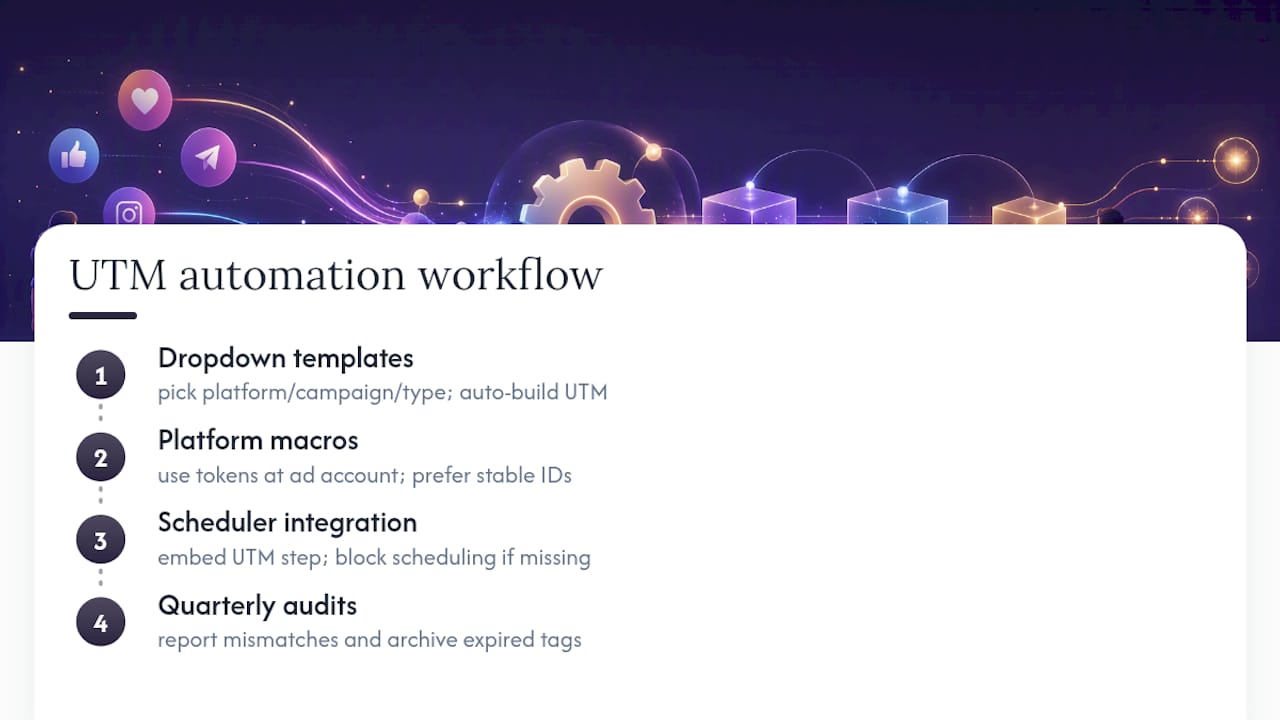
Quarterly audits close the loop. Pull a report of all live UTM values, flag anything that doesn’t match the naming registry, and archive tags tied to campaigns that have ended.
Author Perspective: UTM Ops as Social Ops, Not an Analytics Tax
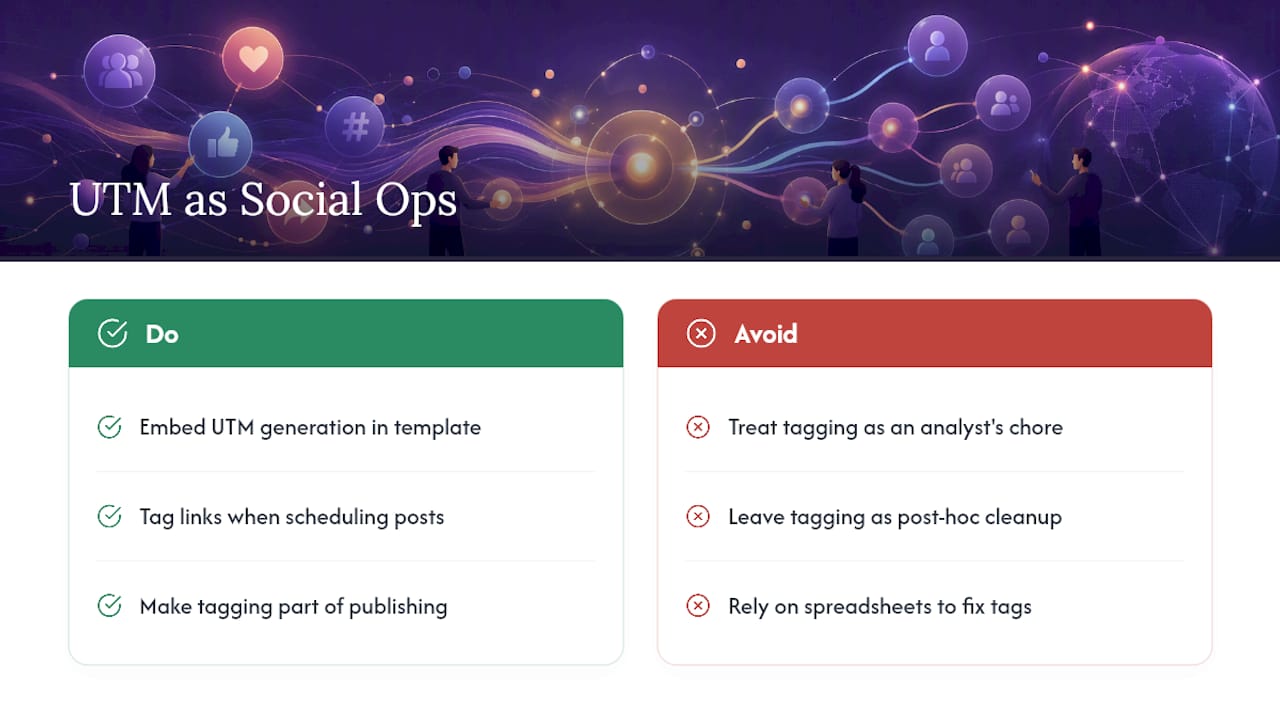
Most teams treat UTM tagging as a chore bolted onto publishing, something an analyst nags about after the fact. That framing is backwards. Tagging is what turns social work from a gut-feel activity into something with a defensible number attached to it.
The fix isn’t a better spreadsheet. It’s embedding UTM generation into the editorial template itself, so tagging happens at the same moment a post gets scheduled, not as a cleanup step three weeks later when someone finally asks which post drove the signups.
— Andrea
Try Rdyrct for Tagged, Privacy-Friendly Short Links
Most link shorteners force a trade: readable branded links or clean UTM tracking, rarely both without extra tools stitched together. Rdyrct is built around that specific gap for social teams. It pairs a UTM builder directly with short link creation, so tagging and shortening happen in one workflow instead of two, and its analytics report referrer, country, and device data without storing IP addresses.

That matters most for influencer campaigns and regulated industries where third-party tracking is a liability, not just a nice-to-have. If you also need QR codes tied to the same tagged links for print or events, Rdyrct’s QR code generator builds them from the same short link. Plans start at Rdyrct’s Free tier, with Hobby and Pro tiers for teams that need more history and custom domains. Set up your first tagged link at Rdyrct and run it through the validation checklist above before your next campaign goes live.
Sources
- Dynamic UTM Tracking - LinkedIn | Microsoft Learn
- UTM Tracking Codes and Digital Marketing
- UTM Parameters for Social Media: Practical Setup | TrackFunnels
FAQ
What Is UTM in Social Media?
UTM stands for Urchin Tracking Module, a set of five URL parameters that identify where a social click came from, including the platform, campaign, and specific creative. Analytics tools like GA4 parse these tags to attribute traffic accurately instead of grouping it as generic referral or direct visits.
What Does UTM Stand For?
UTM stands for Urchin Tracking Module, named after Urchin Software, the analytics company Google acquired before building Google Analytics. The five parameters it defines, utm_source, utm_medium, utm_campaign, utm_content, and utm_term, remain the standard structure used across nearly all analytics platforms today.
What Does “UTM” Mean on Instagram?
On Instagram, a UTM tag is the query string you add to a bio link, Story swipe-up, or ad destination URL so that clicks get credited to the correct campaign and creative in your analytics. Instagram itself doesn’t require UTMs, but without them, most of that traffic shows up as unattributed or direct.
What Does UTM Mean on Snapchat?
On Snapchat, UTM parameters work the same way they do on other platforms: they’re appended to any link you place in an ad or Story swipe-up so analytics can trace the click back to that specific placement. Snapchat’s own ad reporting captures in-platform performance, but a UTM is still what lets that traffic show up correctly in GA4 alongside your other channels.
Are UTM Values Case-Sensitive?
Yes. GA4 treats Facebook, facebook, and FB as three separate sources rather than one, which fragments your reporting if casing isn’t standardized. Enforcing a lowercase-only convention across every team member is the simplest fix.
Can Rdyrct Help Manage UTM Links for Social Campaigns?
Yes. Rdyrct combines a UTM builder with branded short links and privacy-friendly analytics that skip IP storage entirely, which fits directly into the build, shorten, verify workflow this guide describes. Pricing starts on the Free plan, with paid tiers unlocking custom domains and longer analytics history.