30 Day UTM Governance for Marketers: Clean GA4 and Privacy First Links
30 Day UTM Governance for Marketers: Clean GA4 and Privacy First Links
UTM parameters are the five querystring tags (utm_source, utm_medium, utm_campaign, utm_term, utm_content) that tell your analytics platform where a visitor came from. At minimum, tag every campaign link with utm_source, utm_medium, and utm_campaign. Before you tag a single link, agree on a naming convention as a team and build links through a URL builder instead of typing them by hand. That one habit prevents most of the reporting chaos this guide exists to fix.
TL;DR:
- Using inconsistent capitalization and incomplete tagging can fragment campaign data, causing sessions to misclassify or fall into unassigned buckets in GA4.
- At minimum, always include
utm_source,utm_medium, andutm_campaign, ensuring values are lowercase and standardized across campaigns.- Verify that final URLs maintain UTM parameters after redirects and use a URL builder to avoid manual errors and streamline the tagging process.
- Implement a shared naming convention document and review process to prevent fragmentation and ensure campaign data remains clean and comparable over time.
- For offline and QR campaigns, always set UTM parameters before generating links or QR codes, and test scans to confirm attribution tags load correctly.
Table of Contents
- UTM Basics: How Analytics Read UTM Tags and Why Consistency Matters
- The Five UTM Parameters: What Each Does and When to Set It
- How to Build UTM-Tagged Links: Manual Syntax, Builders, and Validation
- Naming Conventions and Governance: Rules to Prevent Fragmentation
- Practical Channel Examples: Email, Social, Paid Ads, and QR/Offline Tagging
- How to View and Interpret UTM Data in GA4 and Other Analytics Tools
- Common Pitfalls and Troubleshooting Steps
- Advanced Topics: utm_id, Dynamic Macros, Server-Side Capture, and Privacy Impacts
- Privacy-First Short Link Workflows and QR-Safe UTM Practices
- What 30 Days of UTM Governance Actually Looks Like
- Try a UTM Builder That Doesn’t Log Every Click Against Your Visitors
- Sources
- FAQ
UTM Basics: How Analytics Read UTM Tags and Why Consistency Matters
A UTM tag is nothing more than extra text appended to a URL after a question mark. When someone clicks https://example.com/landing?utm_source=newsletter&utm_medium=email&utm_campaign=spring-sale, the browser loads the page and the analytics script running on it reads those key value pairs before the user does anything else. That data gets written into a session record, not tied to the user’s identity long term. It’s a single snapshot taken at the moment of arrival.
In GA4, those values populate two connected sets of fields: the session source/medium/campaign dimensions you see in exploration reports, and a few extra fields Google added specifically for paid media reconciliation, including utm_id and utm_source_platform, both of which Google’s own documentation recommends pairing with the standard three tags for cleaner cross-platform attribution. The catch: GA4 doesn’t guess at intent. If utm_medium reads “Email” in one campaign and “email” in another, GA4 treats them as two separate values. That single capitalization difference is often enough to fracture a channel’s data into two rows, and it can quietly push sessions into an “Unassigned” bucket inside Default Channel Grouping, the automated system GA4 uses to sort traffic into buckets like Organic Search or Paid Social.
Before you trust a campaign report, run through a short validation pass:
- Confirm the medium value matches one from your team’s approved list, not a rough approximation of it.
- Check that source and campaign values are lowercase and free of stray spaces or punctuation.
- Pull a sample of sessions and look at their landing page URL to confirm the querystring survived the click.
- Compare the campaign’s numbers against what you’d expect given ad spend or send volume. A suspiciously low session count usually means a tagging problem, not a bad campaign.
The Five UTM Parameters: What Each Does and When to Set It
Three of the five parameters are non-negotiable for any tagged link; the other two are situational. Get this right once and you rarely have to think about it again.
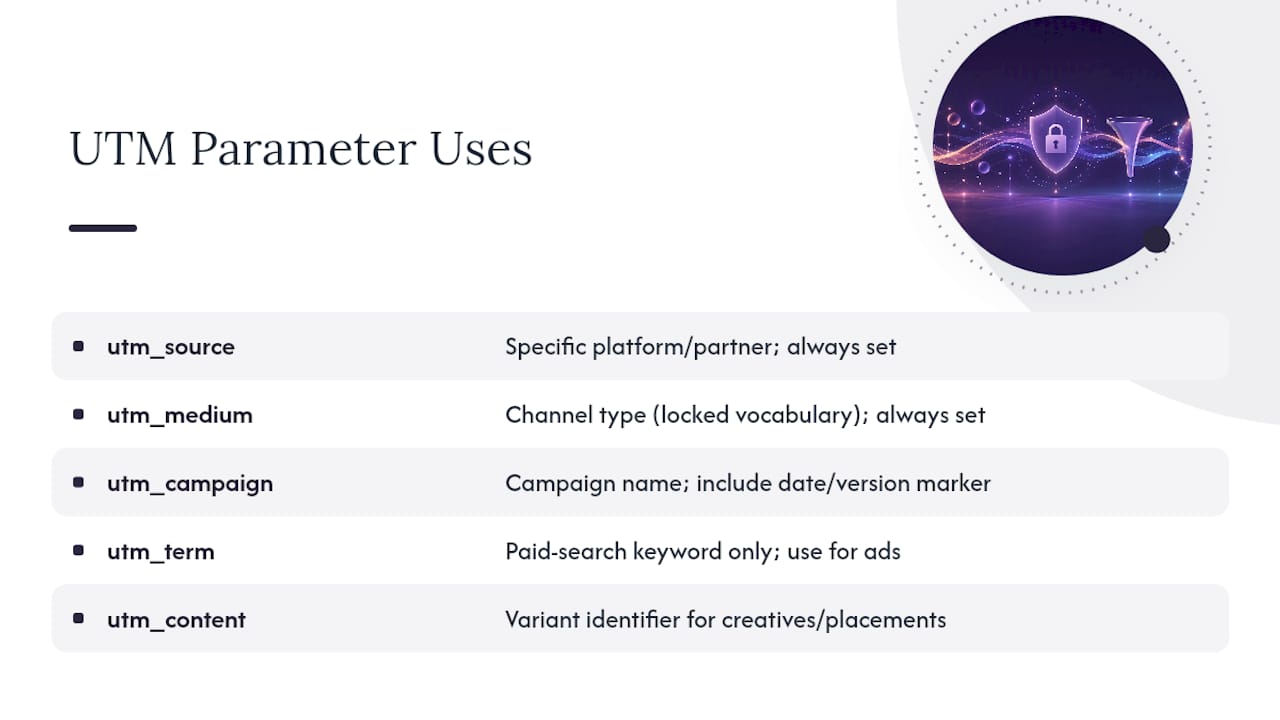
utm_source identifies exactly where the click originated. Not the general channel, the specific platform or partner: newsletter, facebook, google, partner-newsletter-jones. Vague values like “web” or “marketing” defeat the purpose entirely.
utm_medium identifies the channel type, and this is the field GA4 leans on hardest for Default Channel Grouping. Stick to a locked vocabulary: email, social, cpc, display, qr, affiliate. Inventing a new medium value for every campaign is the single fastest way to break channel reporting.
utm_campaign names the specific initiative: spring-sale-2026, product-launch-q2, webinar-attribution. Include a date or version marker when a campaign repeats seasonally, so newsletter-2026-03 doesn’t collide with next year’s version.
utm_term exists almost exclusively for paid search keyword tracking, capturing the exact search term or keyword group tied to a click. Outside paid search, leave it out. Overusing it on social or email links just adds noise nobody reads.
utm_content differentiates between variants inside the same campaign, whether that’s two ad creatives, two email buttons, or two link placements on the same page: header-cta versus footer-cta.
Here’s a complete example that puts all five together for a paid search campaign:
https://example.com/pricing?utm_source=google&utm_medium=cpc&utm_campaign=q2-pricing-push&utm_term=url-shortener-privacy&utm_content=headline-a
Everything after the question mark tells you, at a glance, exactly where that click came from and what version of the ad delivered it.
How to Build UTM-Tagged Links: Manual Syntax, Builders, and Validation
The manual format is simple once you’ve seen it once: take your base URL, add a question mark, then string together key=value pairs separated by ampersands. Parameter order genuinely doesn’t matter to any analytics platform. utm_medium=email&utm_source=newsletter reads identically to utm_source=newsletter&utm_medium=email.
Typing that by hand for every campaign is where mistakes creep in, though. Here’s a cleaner process:
- Start with Google’s Campaign URL Builder or the GA4 developer tools builder rather than a blank text editor.
- Pull your source, medium, and campaign values from a shared naming document, not memory.
- For ad platforms and email tools, use the platform’s dynamic macros (placeholders the platform fills in automatically, like
{campaignid}in Google Ads) instead of typing static values, which cuts down on copy-paste errors across dozens of ad variations. - Paste the finished link into a new browser tab and click it, watching where it actually lands.
- Check the final URL bar for the full querystring. If a redirect stripped it, the parameters are gone and no amount of GA4 configuration will bring them back.
- Open GA4’s real-time report and confirm the session shows the expected source, medium, and campaign before you push the link live anywhere.
Pro Tip: Bookmark your finished, validated link somewhere your whole team can see it before a campaign launches. Catching a stripped parameter after 10,000 emails have already gone out is a much worse day than catching it in a five-second test click.
Naming Conventions and Governance: Rules to Prevent Fragmentation
Four rules stop nearly every fragmentation problem before it starts, and they’re simple enough to fit on a sticky note:
- Lowercase everything, always, with no exceptions for brand names or proper nouns.
- Use hyphens instead of spaces (
black-friday, notblack fridayorblack_friday). - Restrict
utm_mediumto a fixed, short list your whole team memorizes:email,social,cpc,display,affiliate,qr. - Keep
utm_campaignnames short and descriptive, with a date or version tag when the campaign recurs.
A workable naming template looks like this: [initiative]-[year]-[month] for recurring sends, or [initiative]-[variant] for one-off tests. So newsletter-2026-06 and launch-hero-test-a both tell a future analyst exactly what they’re looking at without opening a single report.
Governance matters just as much as the rules themselves. Recommended practices in Semrush’s UTM tracking guide point to a single documented naming register as the highest-leverage fix teams can make, because a rule nobody can find is a rule nobody follows. Keep that register in a shared spreadsheet or wiki page everyone building links can reference, and add a lightweight review step: one person checks new campaign links before launch, catching typos and rogue capitalization before they reach production data. Where your ad or email platform supports dynamic parameters, use them instead of manual entry. A macro that auto-fills the campaign ID removes a whole category of human error.
Practical Channel Examples: Email, Social, Paid Ads, and QR/Offline Tagging
Every channel needs its own tagging habits, and copying one channel’s pattern onto another usually causes more confusion than it solves.
Email: Tag every external link in a send, not just the main call-to-action button. Use utm_source=newsletter (or your specific list name) and differentiate placements with utm_content=header-link versus utm_content=footer-link so you can see which position actually earns clicks.
Social: Give each platform its own source value, utm_source=linkedin, utm_source=instagram, rather than lumping them under one generic “social” tag. Separate the medium too: paid posts get utm_medium=paid-social. Organic posts get utm_medium=social, so the two never blend together in a channel report.
Paid ads: Lean on utm_term for keyword capture and let dynamic macros populate campaign and ad group IDs automatically. Manually typing UTM values across hundreds of keyword-level ads is where most paid search tagging falls apart.
QR and offline campaigns: Build the full UTM-tagged URL first, set utm_medium=qr to keep it distinct from digital-only traffic, and only then generate the QR code from that finished link. Test the scan flow yourself on a phone before printing anything, because a QR code pointed at an untagged URL is invisible to attribution the moment it’s on a poster.

How to View and Interpret UTM Data in GA4 and Other Analytics Tools
Session source, medium, and campaign live inside GA4’s Traffic Acquisition report and inside custom explorations, where you can break them out as dimensions alongside conversions or revenue. That’s also where mistakes surface fastest.
A mistyped utm_medium value doesn’t just look wrong in a table. It actively reroutes sessions into the wrong bucket inside Default Channel Grouping, GA4’s automatic system for sorting traffic into categories like Paid Search or Organic Social. According to Google’s documentation on campaign data collection, these fields are session-scoped dimensions, meaning a bad value from one campaign doesn’t retroactively fix itself. It just sits there, permanently misfiled.
Quick checks worth running whenever a campaign report looks off:
- Filter a report by the full querystring rather than the campaign name alone, since two campaigns can share a name but use different medium values.
- Inspect first-session dimensions on a sample of users to confirm the acquisition data matches what you tagged.
- Sample a handful of conversion events and trace them back to their originating session’s source and medium.
- If you run Mixpanel, Amplitude, or Segment alongside GA4, remember each platform parses the same querystring slightly differently, so a value that displays cleanly in one tool may need reformatting in another.
Common Pitfalls and Troubleshooting Steps
Most broken attribution traces back to a small set of repeat offenders.
- Tagging internal links. A UTM tag on a link between your own pages overwrites the visitor’s original source with whatever you just tagged, corrupting the session’s true origin.
- Inconsistent casing.
Emailandemailread as two different mediums to GA4, splitting one channel’s data into two rows. - Redirects or CDNs that strip querystrings. Some URL shorteners and content delivery layers drop everything after the question mark during a redirect hop, which technical breakdowns of UTM behavior flag as one of the most common silent failures in tagging setups.
- Double-encoding and malformed values. Special characters (spaces, ampersands) need proper percent-encoding once, not twice; double-encoded values often render as broken strings inside reports instead of clean campaign names.
Pro Tip: Before any campaign goes live, click the finished link yourself and watch the address bar the entire way through the redirect. If the querystring is gone by the time the page loads, fix it there. Fixing it after launch means the data you already collected is unrecoverable.
Advanced Topics: utm_id, Dynamic Macros, Server-Side Capture, and Privacy Impacts
For teams managing paid media at scale, utm_id and utm_source_platform help stitch ad spend data to session data at the platform level, which matters when you’re reconciling cost reports from an ad platform against GA4’s session counts. Dynamic macros, the placeholder tokens your ad platform swaps in automatically at click time, remove the manual entry step entirely across large campaign sets.
When client-side tagging proves unreliable, server-side capture or a first-party cookie handoff can preserve attribution data that would otherwise get lost between the click and the landing page load. This matters more each year: enterprise guidance on UTM parameter behavior notes that link-tracking protections built into iOS and Safari can strip known tracking parameters from links shared through Messages or Mail in certain contexts. Testing your links across those specific sharing paths, not just a desktop browser, is the only real mitigation.
Privacy-First Short Link Workflows and QR-Safe UTM Practices
Once your UTM link is built and validated, shortening it is the last step, and it’s where privacy considerations often get ignored. A short-link platform that stores every visitor’s click data is quietly building a tracking dataset most teams never intended to create.
The safer sequence: build the UTM-tagged URL, click through to confirm the final querystring is intact, then shorten it with a privacy-first link builder that reports referrer and device data without logging IP addresses. For QR codes, follow the same order: set the UTM parameters before generating the QR image, not after, so the printed code always points to a fully tagged destination. Test the scan on an actual phone, not just a desktop preview, and confirm the UTM values still appear once the page loads.
What 30 Days of UTM Governance Actually Looks Like
Most teams don’t need a quarter-long rollout. They need a policy document, one approved builder, a single pilot campaign, and a feedback loop after two weeks of data. Expect friction from people who’ve tagged links their own way for years. Buy-in comes faster once you show them a report where their old campaign shows up split into three fragmented rows.
Pick one recurring newsletter or social series as your pilot. Tag it correctly for a month, then compare its data cleanliness against the messy history before it. That contrast sells the policy better than any memo could.
— Andrea
Try a UTM Builder That Doesn’t Log Every Click Against Your Visitors
Most URL builders hand you a tagged link and stop there, leaving you to store, shorten, and track it somewhere else, often a tool that logs IP addresses by default. Rdyrct combines the UTM builder, a privacy-first QR code generator, and click analytics that report country, referrer, and device data without storing visitor IP addresses, so the governance work you just read about doesn’t require stitching together three separate tools. Every plan, including the free tier, gives you a place to build, shorten, and monitor tagged campaign links from one dashboard. Check the pricing page to see what the Hobby and Pro tiers unlock beyond the free plan, or start building your first tagged short link today at Rdyrct.
Sources
For the canonical parameter definitions and Google’s own recommendations, read the Campaign URL Builder documentation directly. The GA4 developer tools builder lets you generate and test links before publishing. For naming convention deep dives, Semrush’s UTM guide and technical breakdowns from MissingLinkz cover platform-specific edge cases worth bookmarking. For teams passing UTM data into a CRM, Astreaux’s lead source tracking guide covers how that handoff typically works.
FAQ
What Are the Five UTM Parameters?
The five standard parameters are utm_source, utm_medium, utm_campaign, utm_term, and utm_content. Source, medium, and campaign are considered essential for every tagged link, while term and content are situational, term for paid search keywords and content for differentiating creative variants.
How Many UTM Parameters Should I Use?
Use at least three: utm_source, utm_medium, and utm_campaign, since these are the fields Google’s documentation recommends including on every tagged link. Add utm_term for paid search keywords and utm_content when you need to distinguish between creative variants or link placements.
How Do I Use UTM Parameters Correctly?
Build the link by appending a question mark to your URL followed by key-value pairs joined with ampersands, ideally through a builder like Google’s Campaign URL Builder rather than typing it manually. Keep every value lowercase, pull source and medium values from a documented naming list, and always click the finished link to confirm the querystring survives before publishing it anywhere. A tool like Rdyrct’s UTM builder can handle the tagging and shortening in one pass.
What Are Some Common UTM Mistakes?
The most damaging mistakes are tagging internal links (which overwrites the original session source) and inconsistent capitalization (which fragments one channel into multiple rows in GA4). Redirects that strip querystrings and double-encoded special characters cause similar quiet failures, which is why validating final URLs before launch matters more than fixing reports after the fact.
Does Rdyrct Include a UTM Builder?
Yes, Rdyrct’s platform includes a built-in UTM builder alongside its short link and QR code tools, so you can tag, shorten, and track a campaign link without exporting data between separate services. Current plan details, including the free tier, are listed on the pricing page.