Long URL Parameter Safety: A Practical Rulebook for Developers
Long URL Parameter Safety: A Practical Rulebook for Developers
Long URL parameters are safe only when they carry non-sensitive, idempotent data that would be fine printed on a postcard. They are not safe for PII, auth tokens, session identifiers, or anything that changes state on your server. This isn’t a style preference. RFC 7231 defines GET as safe and idempotent by design, and OWASP’s guidance on query string exposure documents exactly why: anything in a query string ends up in server logs, Referer headers, and browser history whether you intended it to or not.
Three things to fix today:
- Stop putting emails, tokens, or session IDs in query strings.
- Move large or sensitive payloads to POST bodies.
- Sign any parameter that must ride in a URL, and treat it as visible, not secret.
Key Takeaways
Long URL parameter safety comes down to one rule: never put sensitive or state-changing data anywhere GET can log, cache, or forward it.
| Point | Details |
|---|---|
| Know the leak paths | Referer headers, server logs, browser history, and analytics platforms all capture query strings automatically. |
| Exclude sensitive data types | Never send credentials, tokens, session IDs, emails, or payment data in a query string. |
| Sign, don’t hide | HMAC and JWTs prove a parameter wasn’t tampered with, but they don’t keep it confidential. |
| Set server-side limits | Cap parser depth, parameter count, and request size to block DoS-style abuse. |
| Use opaque references for shareable links | Services like Rdyrct replace exposed payloads with short, privacy-preserving tokens backed by server-side state. |
Table of Contents
- Where Long URL Parameter Safety Breaks Down
- What You Should Never Put in a Query String
- Safer Places to Put Your Data
- Tamper-Proofing Parameters That Must Stay in the URL
- Server-Side Limits That Stop the Damage Before It Starts
- Practical Defaults Worth Setting in 2026
- A Privacy-First Way to Keep Payloads Out of Your URLs
- Frequently Asked Questions
- Sources
Where Long URL Parameter Safety Breaks Down
The leak doesn’t happen where most developers expect. It’s rarely a hacker cracking your server. It’s your own infrastructure doing exactly what it was built to do.
Every hop a URL takes creates a copy. Click a link on Site A that lands on Site B, and the full URL, query string included, gets forwarded in the Referer header to Site B’s servers. Your access logs record it verbatim. Your CDN’s edge logs record it again. Your analytics platform ingests it as a page path. Your load balancer might log it a fourth time. Browser history stores it locally, and screen-sharing tools or screenshots can expose it to anyone in the room.
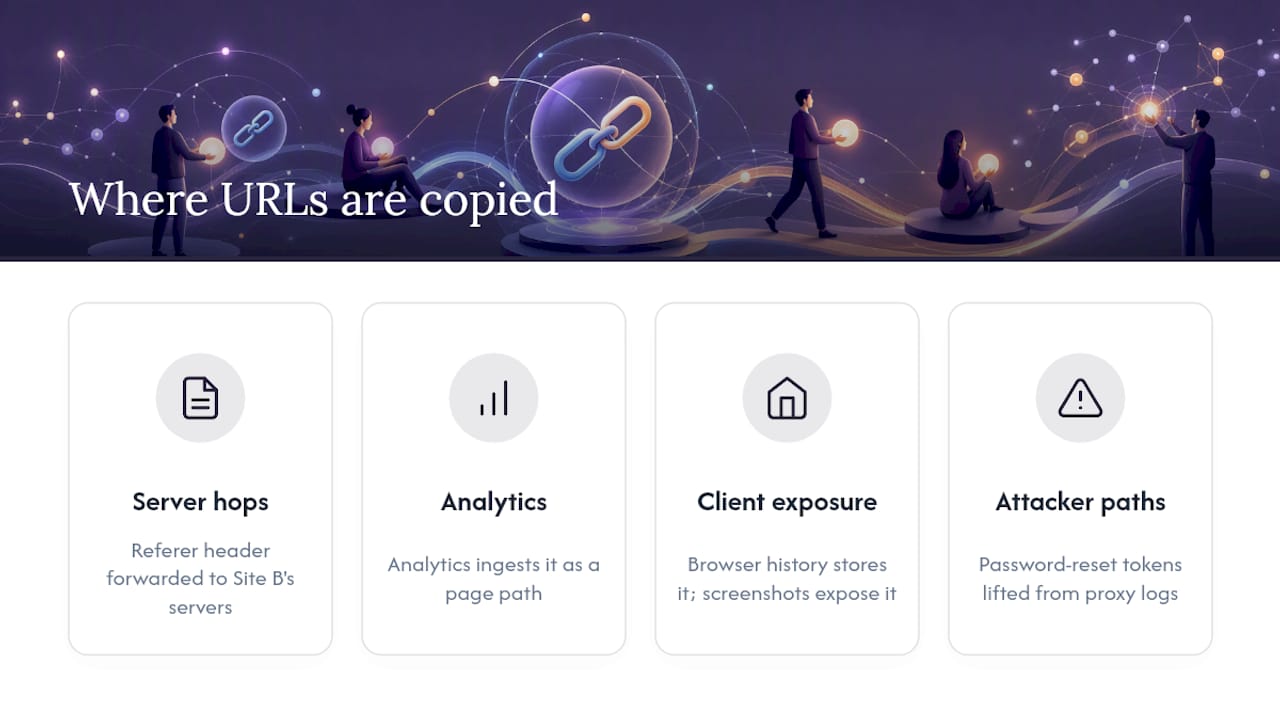
Google’s own PII guidance for Analytics exists because this happens constantly by accident, not by malice. A signup form redirects with ?email=user@example.com in the URL, and now that email sits in ad platform logs, analytics dashboards, and possibly a third-party’s server, all without anyone writing a line of malicious code.
Attackers exploit the same paths deliberately. A password-reset token in a query string can be lifted from a shared Wi-Fi proxy log or a corporate web filter. A user ID passed unsigned invites tampering: change ?user_id=1024 to 1025 and see whose data loads. Poorly configured parsers open a different door entirely, where crafted nested parameters trigger memory exhaustion or prototype pollution.
A URL is not a private channel. Treat every character after the question mark as something that will be copied, cached, and stored somewhere you don’t control.
What You Should Never Put in a Query String
Some data types are non-negotiable exclusions from URLs, full stop. If you’re auditing an existing codebase, search for these first.
- Authentication credentials: passwords, API keys, bearer tokens.
- Session identifiers or refresh tokens.
- Full email addresses, phone numbers, or Social Security numbers.
- Payment card numbers or any raw financial identifier.
- Unhashed personal identifiers tied directly to a real-world identity.
The nuance is in the middle ground. A numeric database primary key (?id=4521) is weak because it’s guessable and enumerable. An opaque, non-derivable token, something like a UUID or a signed reference that reveals nothing about sequence or identity and can be revoked server-side, is a reasonable compromise. The test is simple: if someone captured this parameter from a log six months from now, could they do anything with it? If yes, it doesn’t belong in a URL.
Safer Places to Put Your Data
POST requests keep payloads out of Referer headers and out of most default log formats, which is why RFC 7231 reserves GET for safe, idempotent reads and pushes anything that changes state, or anything sensitive, toward POST or PUT. That single routing decision eliminates most of the exposure surface discussed above.
Cookies, particularly with HttpOnly and SameSite attributes, are the right home for session and credential state. They never appear in the URL, never get logged by accident, and browsers handle their lifecycle for you. The trade-off is that cookies don’t travel well across origins or into shareable links, which is exactly the scenario where a query parameter tempted you in the first place.

Server-side storage, where the URL carries only a short opaque reference to state held on your backend, splits the difference. Short links follow this same pattern: the visible URL is meaningless without the server-side mapping behind it.
| Approach | Security | Visibility in logs | Implementation effort | Overhead | Best for |
|---|---|---|---|---|---|
| POST/body | High | Low | Low | Minimal | Sensitive or large payloads |
| Cookies (HttpOnly/SameSite) | High | None | Moderate | Minimal | Session and auth state |
| Server-side reference/short link | High | Low | Moderate | Low | Shareable links, campaigns |
| Signed query parameter | Medium | High (visible) | Moderate | Low crypto cost | Small, non-secret state in GET links |
Tamper-Proofing Parameters That Must Stay in the URL
Sometimes a parameter has to live in the URL. Password-reset links, email confirmation links, and pre-filled campaign links all need to work when a browser follows them with no other context. That’s where signed tokens earn their place.
HMAC-signed query blobs attach a cryptographic signature to a parameter set, so your server can verify nothing was altered in transit. JWTs do something similar but bundle claims into a structured, self-contained token, often used when you need issuer and audience metadata alongside the signature. Neither hides the payload. Both prove it hasn’t been tampered with. That distinction trips people up constantly, and security practitioners writing about tamper-proof URL parameters call it out directly: signing is not encryption.
- Pro: tamper detection without a database round-trip to verify state.
- Con: anyone can read the payload; only integrity is protected, not confidentiality.
- Con: JWTs add size, sometimes hundreds of bytes, which pushes you closer to URL length limits.
- Con: revocation is awkward. A signed token is valid until it expires. There’s no clean way to invalidate it early unless you track a denylist server-side.
Rotate signing keys on a schedule, include short TTLs (minutes for reset links, hours at most for most use cases), and add issuer/audience claims if you’re using JWTs so a token minted for one purpose can’t be replayed against another endpoint.
Pro Tip: Never put anything you’d consider a secret inside a signed token just because it’s signed. Signing proves the data wasn’t changed, not that nobody can read it. If confidentiality matters, encrypt the payload or don’t put it in the URL at all.
If it can be tampered with by editing the address bar, sign it. If it can be read by anyone who sees the link, never put a secret in it. Those are two separate problems with two separate fixes.
Server-Side Limits That Stop the Damage Before It Starts
Signing protects individual parameters. Server-side limits protect your infrastructure from the parameters you didn’t anticipate.
- Cap parser depth and count. The
qspackage’s known history of prototype-pollution and parsing DoS issues is the textbook example. Set explicitdepth,parameterLimit, andarrayLimitvalues, and reach for the simplerURLSearchParamswhen you don’t need nested objects at all. - Set request-size ceilings at the server or proxy layer. Nginx, Apache, and IIS all expose settings equivalent to
maxQueryString, and leaving them at defaults invites both accidental and deliberate abuse. - Whitelist expected parameters. Reject anything outside a known shape rather than trying to sanitize the unexpected.
- Redact before you log. Strip tokens, emails, and IDs from access logs at write time, not after the fact.
- Watch for spikes in HTTP 414 (URI Too Long) and 413 (Payload Too Large) as an early signal something upstream is misbehaving.
- Pair server limits with WAF rate-limiting so a flood of oversized requests gets throttled before it reaches your application layer.
Practical Defaults Worth Setting in 2026
Runtimes are catching up to this problem at the platform level. A 2026 Go commit added a default cap of 10,000 parameters per request specifically to block memory-exhaustion attacks built from oversized query strings, a strong signal that parameter-count limits belong in your stack even if your framework doesn’t enforce them yet.
- Parser depth: 5 or fewer nested levels.
- Parameter count: cap well below runtime maximums, often a few hundred is plenty for real forms.
- Array limit: 20 to 50 items unless your use case genuinely needs more.
- Total URL length: keep well under the roughly 2,048-character practical ceiling many browsers and servers still respect.
Test boundary conditions deliberately: send an intentionally oversized query string in staging and confirm you get a clean 414, not a crash or hang.
Balancing usability with strict safety
The instinct to jam more into a URL usually comes from wanting shareable, bookmarkable links, and that instinct isn’t wrong. It just needs a governance step: a whitelist of approved parameters, a review gate before anyone adds a new one, and a default answer of “use a short link or a server-side reference” for anything beyond a couple of simple filters. Start there, and most of the risk in this article never reaches production.
A Privacy-First Way to Keep Payloads Out of Your URLs
Rdyrct gives you the outcome this whole article has been building toward: a short, opaque link that references server-side state instead of exposing it. No email addresses riding in query strings, no session tokens sitting in a Referer header, no guessing games about what a parameter reveals if someone copies the URL into a support ticket.

Where a homegrown signed-token setup means you’re managing key rotation, TTL logic, and redaction rules yourself, Rdyrct handles the mapping and gives you real-time analytics, country, referrer, device, without ever storing IP addresses or the PII your links might otherwise carry. Add a branded domain and a QR code, and the same link works for a campaign, a password-reset flow, or a shared report without leaking anything past the shortened path. If you’re weighing whether to build this internally or hand it off, start with Rdyrct’s free plan and test it against one link you’d currently be nervous sharing.
Frequently Asked Questions
Is it ever acceptable to put a user ID in a URL? Yes, if it’s an opaque, non-sequential identifier that reveals nothing on its own and can be revoked or rotated server-side. A raw incrementing database key is not acceptable because it’s guessable and enumerable.
Does long URL parameter safety affect SEO? Long, heavily parameterized URLs don’t directly hurt rankings, but they can fragment crawl signals and complicate canonicalization. Google’s URL structure guidelines recommend keeping tracking parameters out of indexable URLs entirely.
What’s the practical maximum length for a URL? There’s no single RFC-defined limit, but treating roughly 2,048 characters as a compatibility ceiling avoids most browser and server issues, including unexpected 414 errors.
Are JWTs in URLs encrypted? No. A standard JWT is signed, not encrypted, so its payload is readable by anyone who has the token. Use encryption separately if the contents need to stay confidential.
How do I stop PII from reaching my analytics platform through URLs? Redact or strip PII from URLs before analytics scripts fire, and configure your analytics platform’s PII-avoidance settings, as Google’s Analytics guidance outlines, rather than relying on the platform to filter it after the fact.
Sources
- Information exposure through query strings in URL
- golang/go commit 85c794ddce26
- RFC 7231 (Hypertext Transfer Protocol — HTTP/1.1)
- Best practices to avoid sending PII in Analytics
- npm qs Package Security Review and Safe Usage
Test your own stack’s parser limits and query-string ceilings before an attacker or an audit finds them for you.