SMS Link Tracking: A Complete Implementation Guide
SMS Link Tracking: A Complete Implementation Guide
SMS link tracking means replacing raw destination URLs in your messages with short, redirecting links that log click events and carry UTM parameters through to your analytics. The single most effective first step: enable link shortening at the account level, point it at a branded tracking domain, and attach UTMs to your destination URL before shortening. When a recipient clicks, the resolver records the event server-side and forwards them to the UTM-tagged destination. You know the setup worked when the shortlink resolves correctly, UTM parameters appear in GA4, and a click event shows up in your platform logs.
- Replace raw URLs with short redirecting links so every click is logged.
- Attach UTMs before shortening so parameters survive the redirect.
- Use a branded tracking domain for trust, deliverability, and deep-link support.
- Verify success by confirming click events appear in both platform logs and GA4.
Table of Contents
- How does SMS link tracking actually work?
- How do you enable link shortening and tracking in your SMS platform?
- Why does your tracking domain need to be branded, and what DNS records do you need?
- How do you add UTM parameters and deep links to SMS shortlinks?
- SMS-specific best practices for links, character budgets, and deliverability
- What analytics does SMS click tracking give you, and how do you read the data?
- Testing checklist, troubleshooting, and U.S. compliance notes
- Key Takeaways
- The part most teams skip until it breaks
- Rdyrct handles the technical setup so you can focus on the campaign
- Useful sources and further reading
How does SMS link tracking actually work?
The mechanism is simpler than most developers expect. When your SMS platform shortens a link, it creates a unique key (e.g., go.yourbrand.com/aB3x) that maps to your destination URL. The UTM parameters you appended to the destination are stored server-side, not visible in the SMS itself. When a recipient taps the link, the resolver logs the click event and issues an HTTP redirect to the full UTM-tagged URL.
Tracking happens entirely on the shortlink resolver, not inside the SMS message. That distinction matters for character budgeting and for understanding why link shortening is required for click tracking in SMS. There is no open pixel equivalent in text messaging. Link clicks and delivery receipts are the only reliable engagement signals you have.
A click event typically captures: timestamp, shortlink key, resolved destination URL (
clickedUrl), device type, referrer, campaign ID, and anisBotflag. Filter onisBot = falsebefore computing any engagement rate — bot traffic can inflate raw click counts significantly, and most platforms expose this flag precisely for that reason.
Deep links add one layer. When a shortlink should open a native app rather than a browser, the resolver checks for apple-app-site-association (iOS) and assetlinks.json (Android) files hosted on the tracking domain. If those files are present and valid, the mobile OS hands off to the app. If not, the user lands in a browser instead. This is why deep links require a custom tracking domain: generic shortlink domains cannot host those association files.
| Data field | What it tells you |
|---|---|
clickedUrl |
The original destination URL the shortlink resolved to |
| Shortlink key | Unique identifier for the specific link in that campaign |
| Timestamp | When the click occurred (useful for time-of-day analysis) |
| Device type | Mobile vs. desktop; OS breakdown for deep-link diagnostics |
| Referrer | Where the click originated (usually empty for direct SMS taps) |
| Campaign ID | Ties the click back to the sending campaign |
isBot |
Flag to filter automated/crawler clicks from human engagement |

How do you enable link shortening and tracking in your SMS platform?
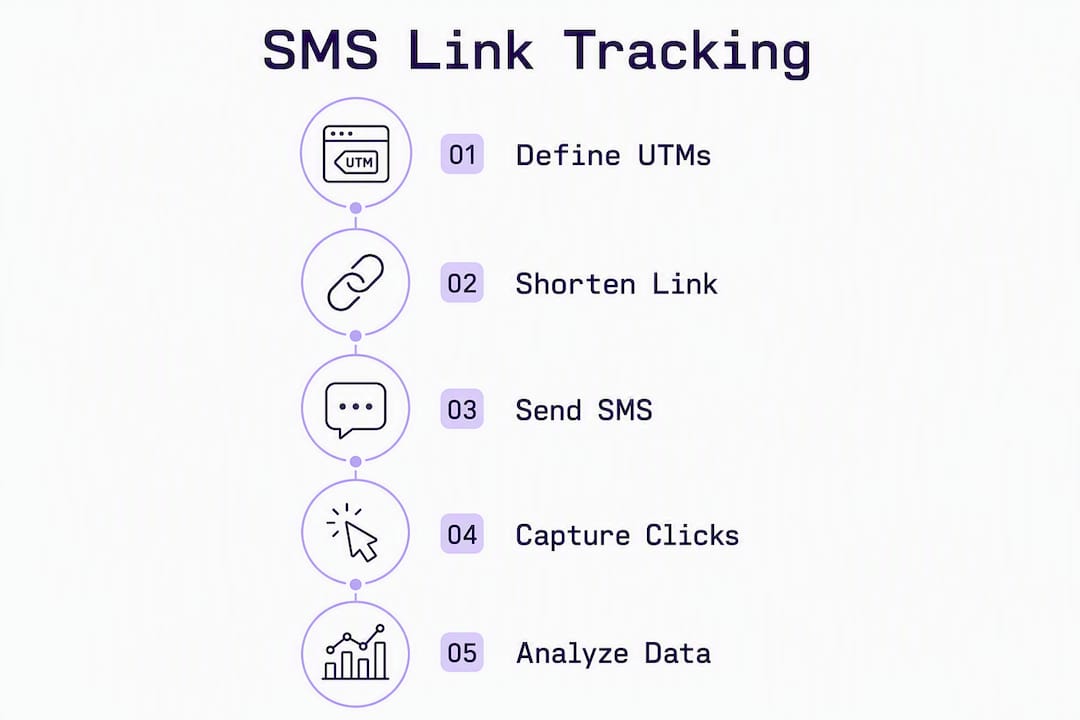
Configuration splits cleanly between account-level prerequisites and per-campaign toggles. Get the account settings right once; the campaign steps repeat for every send.
Account-level setup:
- Navigate to your platform’s domain or messaging settings and add your branded tracking domain.
- Verify domain ownership via the DNS record your platform requires (usually a CNAME or TXT record).
- Confirm HTTPS is active on the domain. Most platforms will block shortlink creation on non-SSL domains.
- Set a minimum key length of multiple alphanumeric characters to reduce guessability.
- Configure the default shortlink behavior: decide whether all links in outbound SMS are shortened automatically or only when explicitly flagged.
Campaign-level steps:
- Open the template or campaign settings and toggle “Shorten and track links” (the label varies by platform).
- Select your branded tracking domain from the dropdown. If it is not listed, return to account settings and complete domain verification.
- Confirm UTM parameter settings. Some platforms append UTMs automatically from campaign metadata; others require you to pre-attach them to the destination URL in the template.
- For personalized sends, use your platform’s template syntax (Handlebars, Liquid, or similar) to inject recipient-specific destination URLs. Example:
{{destinationUrl}}resolves per-contact before the shortener runs, so each recipient gets a unique tracked shortlink.
QA before you send:
- Send a test message to a real iOS device and a real Android device.
- Tap the shortlink and confirm it resolves to the correct destination with UTM parameters visible in the browser address bar.
- Check your platform’s click event logs and confirm the event appears within seconds.
- Open GA4 and verify the session is attributed to the correct source/medium.
Pro Tip: Send your test to a device on a different carrier than your development phone. Some carriers rewrite or strip shortlinks differently, and catching that in QA is far cheaper than diagnosing it after a full send.
Why does your tracking domain need to be branded, and what DNS records do you need?
A generic shortlink domain (bit.ly/xyz, t.co/abc) signals nothing about who sent the message. Recipients hesitate, and carriers sometimes filter messages with unfamiliar shortlink domains more aggressively. A branded domain (go.yourbrand.com) tells the recipient immediately who the link belongs to, which reduces click hesitation and lowers the chance of carrier filtering.
Owning your redirect domain also eliminates dependency on a third-party shortener’s uptime. If that service goes down, every link in every message you have ever sent stops working.
DNS checklist:
- CNAME record: Point your tracking subdomain (
go.yourbrand.com) to the hostname your SMS platform or shortlink provider specifies. TTL of 300–600 seconds during initial setup; raise to 3600 after verification. - A record (if required): Some platforms use an IP-based setup instead of a CNAME. Use whichever your vendor documents.
- Deep-link association files: Host
/.well-known/apple-app-site-associationand/.well-known/assetlinks.jsonon the tracking domain. The mobile OS fetches these files to decide whether to open the app or the browser. Confirm the files return valid JSON with the correct bundle identifier (iOS) and package name/SHA-256 fingerprint (Android). - TLS certificate: Your tracking domain must serve HTTPS. Most platforms provision a certificate automatically after DNS verification. After propagation, run
curl -I https://go.yourbrand.comand confirm a 200 or 301 response with no certificate errors.
Verification checklist:
- Use a DNS propagation checker to confirm the CNAME resolves globally before enabling the domain in your platform.
- Complete platform domain verification (usually a button in settings that pings your domain).
- Visit the association file URLs in a browser and confirm valid JSON responses.
- Test a deep link on a physical iOS and Android device.
- Document a rollback plan: if DNS misconfiguration causes link failures, know which records to revert and how quickly your TTL allows propagation.
Pro Tip: Set a low TTL (300 seconds) before making any DNS changes. That way, if something breaks, the revert propagates in five minutes instead of an hour.
How do you add UTM parameters and deep links to SMS shortlinks?
UTM parameters must be attached to the destination URL before the shortening step. This is the single most common attribution mistake in SMS campaigns. If you shorten first and add UTMs later, the resolver has no parameters to pass through, and GA4 will classify those sessions as direct or unassigned traffic.
Recommended UTM taxonomy for SMS:
utm_medium=sms(consistent across all SMS sends; this is what GA4 uses to group the channel)utm_source=the sending platform or list name (e.g.,iterable,twilio,weekly-promo-list)utm_campaign=a short, consistent campaign identifier (e.g.,summer26-flash-sale)utm_content=optional; use for A/B link variants within the same campaign
Keep values lowercase, hyphen-separated, and short. Spaces and special characters must be URL-encoded (%20, %26), but the cleaner fix is to avoid them entirely in UTM values.
Parameter application order:
- Build the destination URL with UTMs appended:
https://yourbrand.com/sale?utm_medium=sms&utm_source=twilio&utm_campaign=summer26 - Paste that full URL into your platform’s link field or template variable.
- The shortener runs and creates
go.yourbrand.com/aB3x, storing the UTM-tagged destination internally. - The recipient taps the shortlink, the resolver redirects to the UTM-tagged URL, and GA4 receives the parameters.
Deep link setup:
- Confirm your app’s bundle ID (iOS) and package name + SHA-256 certificate fingerprint (Android).
- Create valid
apple-app-site-associationandassetlinks.jsonfiles and host them at/.well-known/on your tracking domain. - Verify the files by visiting the URLs in a browser. The response must be
Content-Type: application/jsonwith no redirect. - In your platform, configure the shortlink to use app-intent redirect behavior. Test on a physical device with the app installed and without it (to confirm the web fallback works).
GA4 attribution notes:
GA4’s default channel grouping will not recognize utm_medium=sms unless you create a custom channel group. Without it, SMS traffic often lands in “Unassigned.” Create a custom channel in GA4 Admin → Data Display → Channel Groups, define the rule as utm_medium exactly matches sms, and name it “SMS.” That one step keeps your SMS attribution clean.
Pro Tip: Build a shared UTM taxonomy spreadsheet that marketing and engineering both maintain. Inconsistent casing (SMS vs. sms) or spelling (summerSale vs. summer-sale) splits what should be one campaign into multiple rows in GA4.
SMS-specific best practices for links, character budgets, and deliverability
A shortlink saves characters, but the surrounding copy still needs to earn the click. Here is how to keep both deliverability and engagement intact.
Character budget: Standard GSM-7 encoding gives you 160 characters per SMS segment. A typical shortlink (go.yourbrand.com/aB3x) runs about two dozen characters, leaving a majority of your message’s character budget for content. If your copy includes any non-GSM characters (curly quotes, emoji, accented letters), the message switches to UCS-2 encoding, dropping the per-segment limit to 70 characters. That single emoji can turn a one-segment message into a three-segment send. Check your platform’s character counter before finalizing copy.
Link placement and copy:
- Place the shortlink after a clear call to action, not at the start of the message.
- Include a brand hint in the surrounding copy (“Shop the sale at go.yourbrand.com/aB3x”) so recipients recognize the sender before tapping.
- One link per message is the standard. Two links in a single SMS increases carrier filtering risk and dilutes click attribution.
Deliverability signals to watch:
- Avoid link-only messages with no surrounding context. Carriers flag them as likely spam.
- Stagger large sends rather than blasting the full list simultaneously. Sudden volume spikes from a single number or short code attract carrier scrutiny.
- Monitor opt-out rates after link-enabled sends. A spike in opt-outs after a campaign with tracked links often signals that recipients found the message suspicious, not that they disliked the offer.
- Use delivery receipts (DLRs) to detect carrier blocks. A high rate of undelivered messages on a specific carrier is a signal to investigate your domain or sending pattern.
Statistic to keep in mind: SMS “open rates” are frequently misreported because standard SMS has no open pixel. The engagement metric that actually reflects behavior is the link click rate: unique clicks divided by delivered messages.
What analytics does SMS click tracking give you, and how do you read the data?
The metrics your platform exposes fall into two layers: delivery-level data from carrier receipts, and engagement-level data from the shortlink resolver.
| Metric | Definition | What to watch for |
|---|---|---|
| Total clicks | All click events on a shortlink | Includes bots; use as a ceiling, not a KPI |
| Unique clicks | Deduplicated by recipient identifier | The primary engagement metric |
| Click rate | Unique clicks / delivered messages | Benchmark against your own historical sends |
| Bot-filtered clicks | Clicks where isBot = true |
High bot rate may indicate carrier link scanning |
| Device breakdown | iOS vs. Android vs. desktop | Informs deep-link prioritization |
| Referrer | Source of the click | Usually empty for direct SMS taps |
Interpreting click rate vs. unique clicks: Total clicks can be inflated by link preview bots that carriers and messaging apps use to generate previews. Always filter on isBot = false and report unique clicks. A message with a large number of delivered messages and proportionally fewer unique human clicks has a click rate that is the ratio of those values. That is the number worth tracking.
Reporting pitfalls:
- Double redirects: If your destination URL itself redirects (e.g., a vanity URL that redirects to a UTM-tagged page), the referrer can be lost at the second hop. Keep the UTM-tagged URL as the final destination.
- Missing UTMs in analytics: Usually caused by attaching UTMs after shortening. Confirm the full UTM-tagged URL is stored in the resolver, not just the clean destination.
- Unassigned traffic in GA4: Caused by missing custom channel group for
utm_medium=sms. Fix this in GA4 Admin before your first send, not after. - Inconsistent campaign IDs: If
utm_campaignvalues vary across sends for the same campaign, GA4 splits the data. Lock down the taxonomy before launch.
Testing checklist, troubleshooting, and U.S. compliance notes
Pre-send QA checklist
- Confirm DNS propagation for your tracking domain using a tool like
digor an online propagation checker. - Verify HTTPS: run
curl -I https://go.yourbrand.comand confirm no certificate errors. - Test the shortlink on a physical iOS device and a physical Android device.
- Confirm UTM parameters appear in the browser address bar after redirect.
- Check that click events appear in platform logs within 30 seconds of tapping.
- Open GA4 in real-time view and confirm the session attributes to the correct source/medium.
- If using deep links, confirm the app opens on a device with the app installed and the browser fallback works on a device without it.
- Run a small controlled pilot send to a warm segment before the full campaign.
Troubleshooting common failures
- Shortlink resolves to a 404: The destination URL stored in the resolver is wrong. Check the template variable and re-verify the destination URL before shortening.
- UTMs missing in GA4: UTMs were attached after shortening. Rebuild the link with UTMs on the destination URL first, then shorten.
- Deep link opens browser instead of app: Association files are missing, returning an error, or hosted on the wrong domain. Visit
https://go.yourbrand.com/.well-known/apple-app-site-associationin a browser and confirm valid JSON. - SSL error on tracking domain: Certificate has not provisioned yet, or DNS has not fully propagated. Wait for propagation and re-trigger certificate issuance in your platform.
- High bot click rate: Normal for some carriers that scan links for malware. Use the
isBotflag to filter. If bot rate exceeds human clicks by a large margin, investigate whether the domain is on a blocklist.
Pro Tip: Keep a log of every DNS change with timestamps. When something breaks post-launch, that log is the fastest way to isolate whether the issue is DNS propagation, a platform setting, or a code change.
U.S. compliance notes
TCPA (Telephone Consumer Protection Act) requires prior express written consent before sending marketing texts. Document that consent at opt-in and store it. Every marketing SMS must include an opt-out mechanism (typically “Reply STOP to unsubscribe”), and you must honor opt-outs immediately.
For link tracking specifically: shortlink logs capture click timestamps, device types, and referrers. They should not capture or retain personally identifiable information (PII) beyond what is operationally necessary. If your platform logs IP addresses, confirm your privacy policy discloses this and evaluate whether retention is required for your use case. Platforms that do not retain IP addresses by default reduce your compliance surface area considerably.
Use a pilot with a control group or a promo code to measure incremental lift when you need to connect SMS clicks to offline or in-store business outcomes.
Key Takeaways
Effective SMS link tracking requires UTMs attached before shortening, a branded custom domain, and a QA step that validates events in both platform logs and GA4 before any full send.
| Point | Details |
|---|---|
| UTMs before shortening | Attach UTM parameters to the destination URL first; shortening after strips attribution from GA4. |
| Branded tracking domain | Use a custom domain for trust, deliverability, and deep-link association file hosting. |
| Bot filtering | Always filter isBot = false before computing click rate; raw totals include carrier scanners. |
| GA4 custom channel | Create a custom channel group for utm_medium=sms to prevent SMS traffic landing as “Unassigned.” |
| Rdyrct for privacy-first tracking | Rdyrct provides branded custom domains, a UTM builder, and privacy-friendly analytics without storing IP addresses. |
The part most teams skip until it breaks
There is a pattern in how SMS tracking implementations fail, and it almost never involves the platform configuration itself. The platform toggles are straightforward. What breaks is the handoff between engineering and marketing, specifically the moment when UTM values are decided.
Marketing builds a campaign, engineering sets up the domain and the shortlink resolver, and then someone pastes a destination URL into the template without UTMs because the taxonomy spreadsheet was not finalized yet. The send goes out. GA4 shows a spike in direct traffic. Nobody connects it to the SMS campaign for three days.
The fix is not technical. It is procedural: lock the UTM taxonomy before engineering touches the platform. The values utm_medium=sms, utm_source, and utm_campaign need to be agreed on and written down before the first test send, not after the first full send.
The second thing teams underestimate is deep-link testing. Developers test on their own devices, which usually have the app installed. The association files look fine. But a significant portion of recipients will not have the app, and the web fallback URL needs to be a real, UTM-tagged page, not a generic homepage. Test the fallback explicitly, on a device with the app uninstalled.
The third gap is bot filtering. Platforms expose the isBot flag, but most default dashboards show raw click totals. If you are reporting to a stakeholder who sees “1,200 clicks” when the human-filtered number is 340, that is a credibility problem waiting to happen. Build the filter into your reporting view from day one.
Rdyrct handles the technical setup so you can focus on the campaign
The guide above covers a lot of ground: DNS records, association files, UTM taxonomy, GA4 channel groups, bot filtering. Most of that complexity lives in the infrastructure layer, not the campaign itself. Rdyrct is built to handle that layer without requiring a dedicated engineering sprint every time you want to run a tracked SMS campaign.

Rdyrct gives you branded custom domains with HTTPS-enabled tracking out of the box, a UTM builder that enforces consistent parameter structure before shortening, and real-time analytics covering country, referrer, and device without storing IP addresses. That last point matters for U.S. senders navigating TCPA and privacy expectations: you get the click data you need without retaining PII you do not. The platform also supports deep-link resolution and exposes an API for teams that want to automate link creation and pull click events into their own reporting stack.
Start with the free plan to validate your domain setup and UTM workflow on a pilot send. When you are ready to scale, the paid tiers unlock longer analytics history, team roles, and higher link volume. Developers can explore the API docs directly at rdyrct.com to automate shortlink creation as part of your SMS send pipeline.
Useful sources and further reading
- Link Shortening and Click Tracking for SMS and WhatsApp — Iterable Support Center: Platform documentation covering how shortlinks replace URLs, UTM pre-shortening behavior, and deep-link association file requirements.
- SMS Open Rates: What the 98% Stat Actually Means — MessageIQ: Clarifies why SMS open rates are not directly measurable and why click events are the reliable engagement metric.
- Rdyrct — Short links that carry your brand: Privacy-first shortlink platform with branded domains, UTM builder, deep-link support, and IP-free analytics for SMS and other channels.